16. SpringBoot3+Vue3实现数据统计图表功能
Ecahrts 官网
https://echarts.apache.org/zh/index.html
安装使用 Echarts
npm i echarts -S
dom 容器
<div style="width=600px; height=400px" id="main"></div>
import * as echarts from 'echarts';

const option = {
  title: {
    text: 'ECharts 入门示例'
  },
  tooltip: {},
  legend: {
    data: ['销量']
  },
  xAxis: {
    data: ['衬衫', '羊毛衫', '雪纺衫', '裤子', '高跟鞋', '袜子']
  },
  yAxis: {},
  series: [
    {
      name: '销量',
      type: 'bar',
      data: [5, 20, 36, 10, 10, 20]
    }
  ]
};

// 基于准备好的dom,初始化echarts实例
const myChart = echarts.init(document.getElementById('main'))
  // 使用刚指定的配置项和数据显示图表。
myChart.setOption(option);
注意:必须在 dom 准备好的时候再去设置初始化 ecahrts 示例
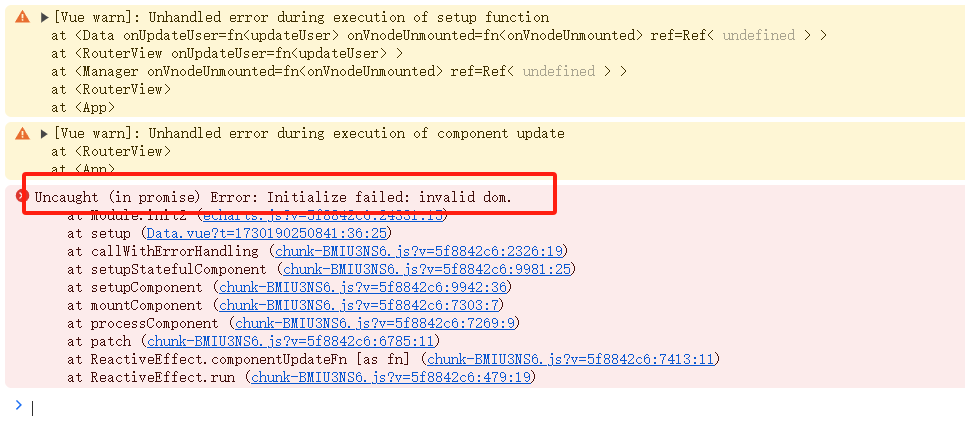
引入 onMouted
import { reactive, onMounted } from "vue";


// onMounted 表示页面的所有dom元素都初始化完成了
onMounted(() => {
  // 基于准备好的dom,初始化echarts实例
  const myChart = echarts.init(document.getElementById('main'))
  // 使用刚指定的配置项和数据显示图表。
  myChart.setOption(option);
})
柱状图
数据结构
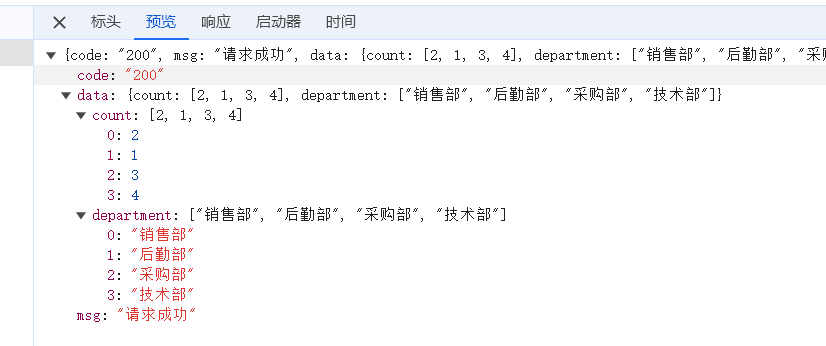
@GetMapping("/barData")
public Result getBarData() {
    Map<String, Object> map = new HashMap<>();
    List<Employee> employeeList = employeeService.selectAll(null);
    Set<String> departmentNameSet = employeeList.stream().map(Employee::getDepartmentName).collect(Collectors.toSet());
    map.put("department", departmentNameSet);  // x轴数据
    List<Long> countList = new ArrayList<>();
    for (String departmentName : departmentNameSet) {
        // 统计这个部门下面的员工的数量
        long count = employeeList.stream().filter(employee -> employee.getDepartmentName().equals(departmentName)).count();
        countList.add(count);
    }
    map.put("count", countList);  // y轴员工数量的数据
    return Result.success(map);
}
设置颜色
itemStyle: {
    normal: {
      color: function () {
        return "#" + Math.floor(Math.random() * (256 * 256 * 256 - 1)).toString(16);
      }
    },
},
折线图
数据结构
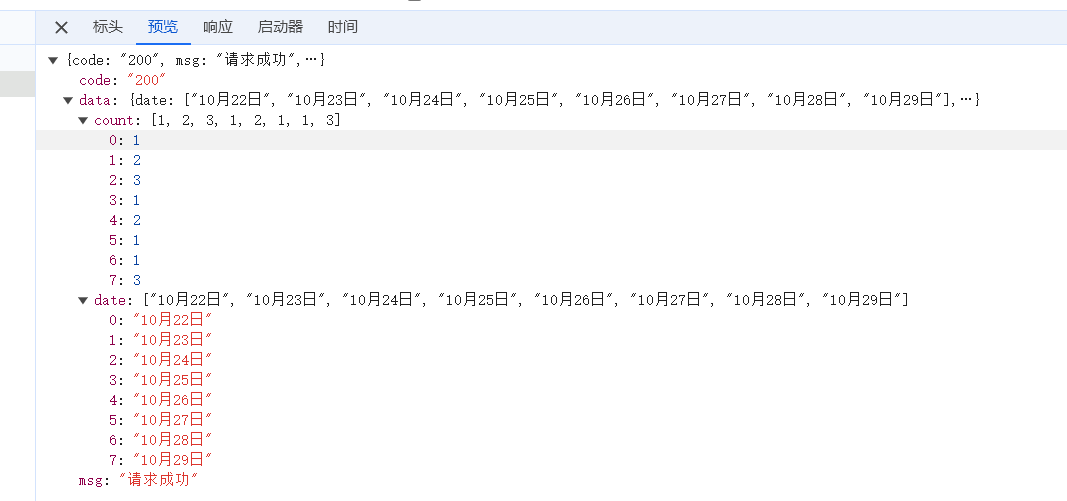
@GetMapping("/lineData")
public Result getLineData() {
    Map<String, Object> map = new HashMap<>();

    Date date = new Date();  // 今天当前的时间
    DateTime start = DateUtil.offsetDay(date, -7); // 起始日期
    List<DateTime> dateTimeList = DateUtil.rangeToList(start, date, DateField.DAY_OF_YEAR);
    // 把 DateTime 类型的日期转换成  字符串类型的日期  ["10月22日", "10月23日"...]
    List<String> dateStrList = dateTimeList.stream().map(dateTime -> DateUtil.format(dateTime, "MM月dd日"))
            .sorted(Comparator.naturalOrder()).collect(Collectors.toList());
    map.put("date", dateStrList);  // x轴数据

    List<Integer> countList = new ArrayList<>();
    for (DateTime day : dateTimeList) {
        // 10月22日
        String dayFormat = DateUtil.formatDate(day);  // 2023-10-22
        // 获取当天所有的发布的文章的数量
        Integer count = articleService.selectCountByDate(dayFormat);
        countList.add(count);
    }
    map.put("count", countList);  // y轴发布文章的数量数据
    return Result.success(map);
}
饼图
数据结构
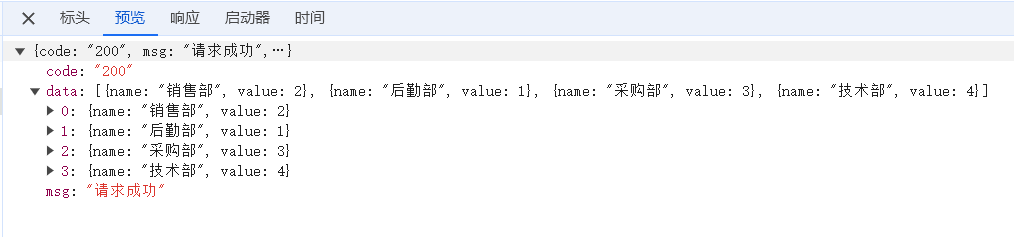
@GetMapping("/pieData")
public Result getPieData() {
    List<Map<String, Object>> list = new ArrayList<>();
    List<Employee> employeeList = employeeService.selectAll(null);
    Set<String> departmentNameSet = employeeList.stream().map(Employee::getDepartmentName).collect(Collectors.toSet());
    for (String departmentName : departmentNameSet) {
        HashMap<String, Object> map = new HashMap<>();
        map.put("name", departmentName);
        // 统计这个部门下面的员工的数量
        long count = employeeList.stream().filter(employee -> employee.getDepartmentName().equals(departmentName)).count();
        map.put("value", count);
        list.add(map);
    }
    return Result.success(list);
}
完整的 Data.vue 代码
<template>
  <div>
    <el-row :gutter="10">
     <el-col :span="12" style="margin-bottom: 10px">
       <div class="card" style="padding: 20px; height: 400px" id="bar"></div>
     </el-col>
      <el-col :span="12" style="margin-bottom: 10px">
        <div class="card" style="padding: 20px; height: 400px" id="line"></div>
      </el-col>
      <el-col :span="12" style="margin-bottom: 10px">
        <div class="card" style="padding: 20px; height: 400px" id="pie"></div>
      </el-col>
    </el-row>
  </div>
</template>

<script setup>
import { reactive, onMounted } from "vue";
import * as echarts from 'echarts';
import request from "@/utils/request.js";

const barOption = {
  title: {
    text: '各部门员工数量'
  },
  tooltip: {},
  legend: {
    trigger: 'item'
  },
  xAxis: {
    data: []
  },
  yAxis: {},
  series: [
    {
      name: '人数',
      type: 'bar',
      data: [],
      itemStyle: {
        normal: {
          color: function (params) {
            let colors = ['#5470c6', '#91cc75', '#fac858', '#ee6666', '#73c0de', '#3ba272', '#fc8452', '#9a60b4', '#ea7ccc']
            return colors[params.dataIndex % colors.length]
          }
        },
      },
    }
  ]
};

const lineOption = {
  title: {
    text: '近7天发布文章的数量'
  },
  tooltip: {},
  legend: {
    trigger: 'item'
  },
  xAxis: {
    data: []
  },
  yAxis: {},
  series: [
    {
      name: '发布数量',
      type: 'line',
      data: [],
      smooth: true
    }
  ]
};

const pieOption = {
  title: {
    text: '各部门员工数量比例图',
    left: 'center'
  },
  tooltip: {
    trigger: 'item'
  },
  legend: {
    orient: 'vertical',
    left: 'left'
  },
  series: [
    {
      name: '员工数量',
      type: 'pie',
      radius: '50%',
      data: [],
      center: ['50%', '50%'],
      label: {
        formatter: '{b}: {@2012} ({d}%)'
      },
      emphasis: {
        itemStyle: {
          shadowBlur: 10,
          shadowOffsetX: 0,
          shadowColor: 'rgba(0, 0, 0, 0.5)'
        }
      }
    }
  ]
};

// onMounted 表示页面的所有dom元素都初始化完成了
onMounted(() => {
  // 基于准备好的dom,初始化echarts实例
  const barChart = echarts.init(document.getElementById('bar'))
  request.get('/barData').then(res => {
    barOption.xAxis.data = res.data.department  // 横轴数据
    barOption.series[0].data = res.data.count   // 纵轴的数据
    // 使用刚指定的配置项和数据显示图表。
    barChart.setOption(barOption);
  })

  // 基于准备好的dom,初始化echarts实例
  const lineChart = echarts.init(document.getElementById('line'))
  request.get('/lineData').then(res => {
    lineOption.xAxis.data = res.data.date  // 横轴数据
    lineOption.series[0].data = res.data.count   // 纵轴的数据
    // 使用刚指定的配置项和数据显示图表。
    lineChart.setOption(lineOption);
  })

  // 基于准备好的dom,初始化echarts实例
  const pieChart = echarts.init(document.getElementById('pie'))
  request.get('/pieData').then(res => {
    pieOption.series[0].data = res.data
    // 使用刚指定的配置项和数据显示图表。
    pieChart.setOption(pieOption);
  })


})


</script>

<style scoped>

</style>
-- 完结撒花~ --