08. 带你实现前台首页功能
轮播图
https://element-plus.org/zh-CN/component/carousel



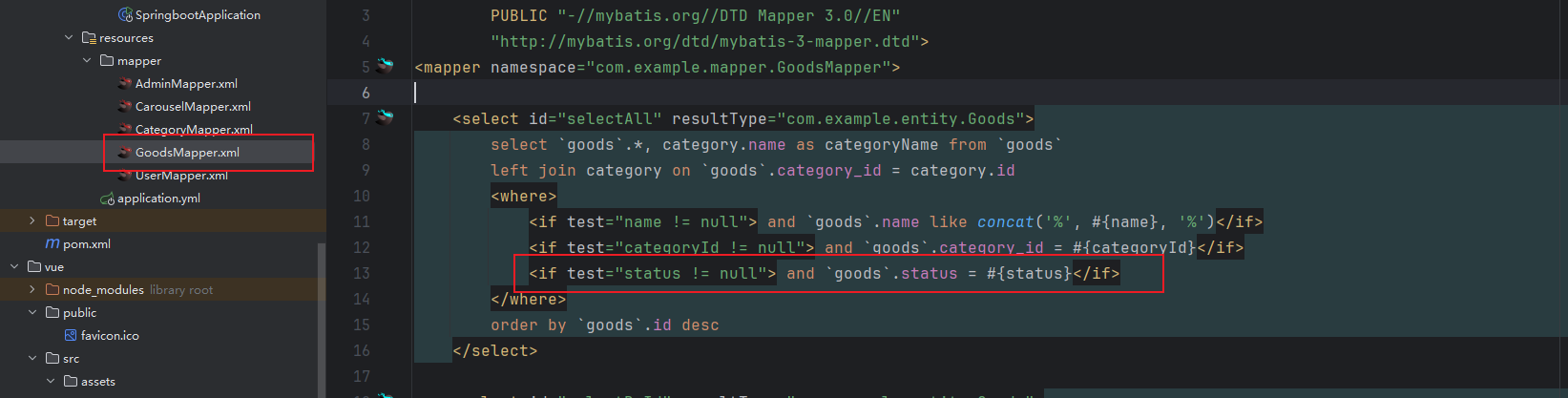
查询上架的商品
CSS 文本多行省略
.line1 {
  white-space: nowrap;
  overflow: hidden;
  text-overflow: ellipsis;
}
.line2 {
  word-break: break-all;
  text-overflow: ellipsis;
  display: -webkit-box;
  -webkit-box-orient: vertical;
  -webkit-line-clamp: 2; /* 超出几行省略 */
  overflow: hidden;
}
页脚
- 创建 components 文件夹,放入一个 Footer.vue 的文件
- 写入页脚的内容
- 在 Front.vue 里面引入
<Footer />
import Footer from "@/components/Footer.vue";
商品表加上推荐的字段
CREATE TABLE `goods` (
  `id` int NOT NULL AUTO_INCREMENT COMMENT '主键ID',
  `name` varchar(255) CHARACTER SET utf8mb4 COLLATE utf8mb4_unicode_ci DEFAULT NULL COMMENT '名称',
  `img` varchar(255) CHARACTER SET utf8mb4 COLLATE utf8mb4_unicode_ci DEFAULT NULL COMMENT '图片',
  `price` decimal(10,2) DEFAULT NULL COMMENT '价格',
  `description` varchar(255) CHARACTER SET utf8mb4 COLLATE utf8mb4_unicode_ci DEFAULT NULL COMMENT '简介',
  `content` longtext CHARACTER SET utf8mb4 COLLATE utf8mb4_unicode_ci COMMENT '详情',
  `store` int DEFAULT '0' COMMENT '库存',
  `category_id` int DEFAULT NULL COMMENT '分类ID',
  `status` varchar(255) CHARACTER SET utf8mb4 COLLATE utf8mb4_unicode_ci DEFAULT NULL COMMENT '上架状态',
  `views` int DEFAULT NULL COMMENT '浏览量',
  `sale_count` int DEFAULT NULL COMMENT '销量',
  `time` varchar(255) CHARACTER SET utf8mb4 COLLATE utf8mb4_unicode_ci DEFAULT NULL COMMENT '创建时间',
  `recommend` varchar(255) COLLATE utf8mb4_unicode_ci DEFAULT NULL COMMENT '推荐',
  PRIMARY KEY (`id`)
) ENGINE=InnoDB AUTO_INCREMENT=1 DEFAULT CHARSET=utf8mb4 COLLATE=utf8mb4_unicode_ci COMMENT='商品信息';
SQL 注意改一下
<insert id="insert" parameterType="com.example.entity.Goods" useGeneratedKeys="true">
        insert into `goods`
        <trim prefix="(" suffix=")" suffixOverrides=",">
            <if test="id != null">id,</if>
            <if test="name != null">name,</if>
            <if test="img != null">img,</if>
            <if test="price != null">price,</if>
            <if test="description != null">description,</if>
            <if test="content != null">content,</if>
            <if test="store != null">store,</if>
            <if test="categoryId != null">category_id,</if>
            <if test="status != null">status,</if>
            <if test="views != null">views,</if>
            <if test="saleCount != null">sale_count,</if>
            <if test="time != null">time,</if>
            <if test="recommend != null">recommend,</if>
        </trim>
        values
        <trim prefix="(" suffix=")" suffixOverrides=",">
            <if test="id != null">#{id},</if>
            <if test="name != null">#{name},</if>
            <if test="img != null">#{img},</if>
            <if test="price != null">#{price},</if>
            <if test="description != null">#{description},</if>
            <if test="content != null">#{content},</if>
            <if test="store != null">#{store},</if>
            <if test="categoryId != null">#{categoryId},</if>
            <if test="status != null">#{status},</if>
            <if test="views != null">#{views},</if>
            <if test="saleCount != null">#{saleCount},</if>
            <if test="time != null">#{time},</if>
            <if test="recommend != null">#{recommend},</if>
        </trim>
    </insert>

    <update id="updateById" parameterType="com.example.entity.Goods">
        update `goods`
        <set>
            <if test="id != null">
                id = #{id},
            </if>
            <if test="name != null">
                name = #{name},
            </if>
            <if test="img != null">
                img = #{img},
            </if>
            <if test="price != null">
                price = #{price},
            </if>
            <if test="description != null">
                description = #{description},
            </if>
            <if test="content != null">
                content = #{content},
            </if>
            <if test="store != null">
                store = #{store},
            </if>
            <if test="categoryId != null">
                category_id = #{categoryId},
            </if>
            <if test="status != null">
                status = #{status},
            </if>
            <if test="views != null">
                views = #{views},
            </if>
            <if test="saleCount != null">
                sale_count = #{saleCount},
            </if>
            <if test="time != null">
                time = #{time},
            </if>
            <if test="recommend != null">
                recommend = #{recommend},
            </if>
        </set>
        where id = #{id}
    </update>
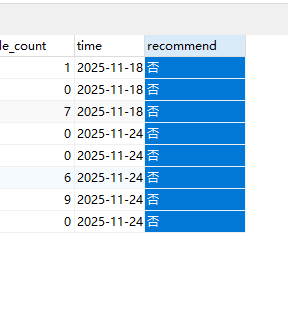
改一下数据库商品表的数据,recommend 设置为否
Home.vue
<template>
  <div class="front-container">
    <!--  第一行开始 -->
    <div style="display: flex; grid-gap: 20px; margin-bottom: 10px">
      <div style="flex: 1">
        <el-carousel height="450px">
          <el-carousel-item v-for="item in data.carouselList" :key="item.id">
            <img @click="router.push('/front/goodsDetail?id=' + item.goodsId)" :src="item.img" alt="" style="width: 100%; height: 450px; cursor: pointer">
          </el-carousel-item>
        </el-carousel>
      </div>
      <div class="card" style="width: 260px">
        <div style="display: flex; align-items: center; padding-bottom: 5px; border-bottom: 1px solid red">
          <img src="@/assets/imgs/love.png" alt="" style="width: 25px">
          <div style="color: red; font-weight: bold; font-size: 20px; margin-left: 2px">为您推荐</div>
        </div>
        <div style="padding: 20px 0">
          <div class="top-item" @click="router.push('/front/goodsDetail?id=' + item.id)" style="cursor: pointer; display: flex; grid-gap: 10px; margin-bottom: 20px" v-for="item in data.recommendGoods" :key="item.id">
            <img style="width: 65px; height: 65px" :src="item.img" alt="">
            <div>
              <div class="line2" style="margin-bottom: 5px">{{ item.name }}</div>
              <div style="color: red"><span>¥</span><b>{{ item.price }}</b></div>
            </div>

          </div>
        </div>
      </div>
    </div>
    <!--  第一行结束 -->


    <div class="card" style="padding: 20px;">
      <!--  第二行开始 -->
      <div style="display: flex; align-items: flex-end; padding-bottom: 5px; border-bottom: 1px solid red; margin-bottom: 10px">
        <div style="flex: 1; display: flex; align-items: center">
          <img src="@/assets/imgs/hot.png" alt="" style="width: 25px">
          <div style="color: red; font-weight: bold; font-size: 20px; margin-left: 2px">热销商品</div>
        </div>
        <div @click="router.push('/front/goods')" style="cursor: pointer; font-size: 13px">查看更多</div>
      </div>
      <div style="margin-bottom: 40px">
        <el-row :gutter="20">
         <el-col :span="6" v-for="item in data.hotGoods" :key="item.id">
           <div @click="router.push('/front/goodsDetail?id=' + item.id)" class="item" style="width: 100%; border-radius: 5px; height: 350px">
             <img :src="item.img" alt="" style="width: 100%; height: 260px; border-radius: 5px 5px 0 0">
             <div style="padding: 5px">
               <div class="line1" style="font-size: 16px;">{{ item.name }}</div>
               <div>
                 <span style="color: red">¥</span><b style="color: red; font-size: 20px">{{ item.price }}</b>
                 <span style="margin-left: 10px; color: #666">销量:{{ item.saleCount }}</span>
               </div>
             </div>
           </div>
         </el-col>
        </el-row>
      </div>
      <!--  第二行结束 -->

      <!--  第三行开始 -->
      <div style="display: flex; align-items: flex-end; padding-bottom: 5px; border-bottom: 1px solid red; margin-bottom: 10px">
        <div style="flex: 1; display: flex; align-items: center">
          <img src="@/assets/imgs/new.png" alt="" style="width: 25px">
          <div style="color: red; font-weight: bold; font-size: 20px; margin-left: 2px">最新上架</div>
        </div>
        <div @click="router.push('/front/goods')" style="cursor: pointer; font-size: 13px">查看更多</div>
      </div>
      <div>
        <el-row :gutter="20">
          <el-col :span="6" v-for="item in data.newGoods" :key="item.id">
            <div @click="router.push('/front/goodsDetail?id=' + item.id)" class="item" style="width: 100%; border-radius: 5px; height: 350px">
              <img :src="item.img" alt="" style="width: 100%; height: 260px; border-radius: 5px 5px 0 0">
              <div style="padding: 5px">
                <div class="line1" style="font-size: 16px">{{ item.name }}</div>
                <div>
                  <span style="color: red">¥</span><b style="color: red; font-size: 20px">{{ item.price }}</b>
                  <span style="margin-left: 10px; color: #666">销量:{{ item.saleCount }}</span>
                </div>
              </div>
            </div>
          </el-col>
        </el-row>
      </div>
    </div>
    <!--  第三行结束 -->


  </div>
</template>

<script setup>
import { reactive } from "vue";
import request from "@/utils/request";
import router from "@/router";

const data = reactive({
  carouselList: [],
  hotGoods: [],
  newGoods: [],
  recommendGoods: [],
})

request.get('/carousel/selectAll').then(res => {
  data.carouselList = res.data
})

request.get('/goods/selectAll', {
  params: {
    status: '上架'
  }
}).then(res => {
  data.hotGoods = res.data.sort((v1, v2) => v2.saleCount - v1.saleCount).splice(0, 4)
})

request.get('/goods/selectAll', {
  params: {
    status: '上架'
  }
}).then(res => {
  data.newGoods = res.data.splice(0, 4)
})

request.get('/goods/selectAll', {
  params: {
    status: '上架'
  }
}).then(res => {
  data.recommendGoods = res.data.filter(v => v.recommend === '是').splice(0, 5)
})
</script>

<style>
.item {
  cursor: pointer;
}
.item:hover {
  border: 1px solid red
}
.top-item:hover {
  color: red;
}
</style>
Goods.vue
<template>
  <div>

    <div class="card" style="margin-bottom: 5px;">
      <el-input v-model="data.name" style="width: 300px; margin-right: 10px" placeholder="请输入名称查询"></el-input>
      <el-select style="width: 300px; margin-right: 10px" v-model="data.categoryId" placeholder="请选择商品分类">
        <el-option v-for="item in data.categoryList" :key="item.id" :value="item.id" :label="item.name"></el-option>
      </el-select>
      <el-button type="primary" @click="load">查询</el-button>
      <el-button type="info" style="margin: 0 10px" @click="reset">重置</el-button>
    </div>

    <div class="card" style="margin-bottom: 5px">
      <div style="margin-bottom: 10px">
        <el-button type="primary" @click="handleAdd">新增</el-button>
      </div>
      <el-table tooltip-effect="dark myEff" :data="data.tableData" stripe>
        <el-table-column prop="name" label="名称" show-overflow-tooltip></el-table-column>
        <el-table-column prop="img" label="图片">
          <template #default="scope">
            <el-image v-if="scope.row.img" :src="scope.row.img" :preview-src-list="[scope.row.img]" preview-teleported style="width: 100px; height: 100px;"></el-image>
          </template>
        </el-table-column>
        <el-table-column prop="price" label="价格"></el-table-column>
        <el-table-column prop="description" label="简介" show-overflow-tooltip></el-table-column>
        <el-table-column prop="content" label="详情">
          <template #default="scope">
            <el-button type="primary" @click="view(scope.row.content)">查看详情</el-button>
          </template>
        </el-table-column>
        <el-table-column prop="store" label="库存"></el-table-column>
        <el-table-column prop="categoryName" label="分类名称"></el-table-column>
        <el-table-column prop="status" label="上架状态"></el-table-column>
        <el-table-column label="推荐">
          <template #default="scope">
            <el-switch @change="updateRecommend(scope.row)" style="--el-switch-on-color: #13ce66;" v-model="scope.row.recommendActive"
                       active-text="是" inactive-text="否"></el-switch>
          </template>
        </el-table-column>
        <el-table-column prop="views" label="浏览量"></el-table-column>
        <el-table-column prop="saleCount" label="销量"></el-table-column>
        <el-table-column prop="time" label="创建时间"></el-table-column>

        <el-table-column label="操作" align="center" width="160">
          <template #default="scope">
            <el-button type="primary" @click="handleEdit(scope.row)">编辑</el-button>
            <el-button type="danger" @click="handleDelete(scope.row.id)">删除</el-button>
          </template>
        </el-table-column>
      </el-table>
    </div>

    <div class="card">
      <el-pagination @current-change="load" background layout="total, prev, pager, next" v-model:page-size="data.pageSize" v-model:current-page="data.pageNum" :total="data.total"/>
    </div>

    <el-dialog title="商品信息" width="50%" v-model="data.formVisible" :close-on-click-modal="false" destroy-on-close>
      <el-form ref="formRef" :model="data.form" :rules="data.rules" label-width="80px" style="padding-right: 30px; padding-top: 20px">
        <el-form-item prop="name" label="名称">
          <el-input v-model="data.form.name" placeholder="请输入名称"></el-input>
        </el-form-item>
        <el-form-item prop="img" label="图片">
          <el-upload :action="uploadUrl" list-type="picture" :on-success="handleImgSuccess">
            <el-button type="primary">上传图片</el-button>
          </el-upload>
        </el-form-item>
        <el-form-item prop="price" label="价格">
          <el-input-number :min="0" v-model="data.form.price" placeholder="请输入价格"></el-input-number>
        </el-form-item>
        <el-form-item prop="description" label="简介">
          <el-input type="textarea" :rows="3" v-model="data.form.description" placeholder="请输入简介"></el-input>
        </el-form-item>

        <el-form-item prop="store" label="库存">
          <el-input v-model="data.form.store" placeholder="请输入库存"></el-input>
        </el-form-item>
        <el-form-item prop="categoryId" label="分类">
          <el-select style="width: 100%" v-model="data.form.categoryId">
            <el-option v-for="item in data.categoryList" :key="item.id" :value="item.id" :label="item.name"></el-option>
          </el-select>
        </el-form-item>
        <el-form-item prop="status" label="上架状态">
          <el-radio-group v-model="data.form.status">
            <el-radio-button label="上架" value="上架"></el-radio-button>
            <el-radio-button label="下架" value="下架"></el-radio-button>
          </el-radio-group>
        </el-form-item>
        <el-form-item prop="content" label="详情">
          <div style="border: 1px solid #ccc; width: 100%">
            <Toolbar
                style="border-bottom: 1px solid #ccc"
                :editor="editorRef"
                :mode="mode"
            />
            <Editor
                style="height: 500px; overflow-y: hidden;"
                v-model="data.form.content"
                :mode="mode"
                :defaultConfig="editorConfig"
                @onCreated="handleCreated"
            />
          </div>
        </el-form-item>

      </el-form>
      <template #footer>
      <span class="dialog-footer">
        <el-button @click="data.formVisible = false">取 消</el-button>
        <el-button type="primary" @click="save">保 存</el-button>
      </span>
      </template>
    </el-dialog>

    <el-dialog title="商品详情" v-model="data.viewVisible" width="50%" :close-on-click-modal="false" destroy-on-close>
      <div class="editor-content-view" style="padding: 20px" v-html="data.content"></div>
      <template #footer>
    <span class="dialog-footer">
      <el-button @click="data.viewVisible = false">关 闭</el-button>
    </span>
      </template>
    </el-dialog>

  </div>
</template>

<script setup>
import request from "@/utils/request";
import {reactive, ref} from "vue";
import {ElMessageBox, ElMessage} from "element-plus";
import '@wangeditor/editor/dist/css/style.css' // 引入 css
import {onBeforeUnmount, shallowRef} from "vue";
import { Editor, Toolbar } from '@wangeditor/editor-for-vue'

const uploadUrl = import.meta.env.VITE_BASE_URL + '/files/upload'
const formRef = ref()
const data = reactive({
  pageNum: 1,
  pageSize: 5,
  total: 0,
  formVisible: false,
  form: {},
  tableData: [],
  categoryList: [],
  name: null,
  categoryId: null,
  viewVisible: false,
  content: null,
  rules: {
    name: [
      { required: true, message: '请输入名称', trigger: 'blur' }
    ],
    img: [
      { required: true, message: '请输入图片', trigger: 'blur' }
    ],
    price: [
      { required: true, message: '请输入价格', trigger: 'blur' }
    ],
    description: [
      { required: true, message: '请输入简介', trigger: 'blur' }
    ],
    content: [
      { required: true, message: '请输入详情', trigger: 'blur' }
    ],
    store: [
      { required: true, message: '请输入库存', trigger: 'blur' }
    ],
    categoryId: [
      { required: true, message: '请输入分类ID', trigger: 'change' }
    ]
  }
})


/* wangEditor5 初始化开始 */
const baseUrl = import.meta.env.VITE_BASE_URL
const editorRef = shallowRef()  // 编辑器实例,必须用 shallowRef
const mode = 'default'
const editorConfig = { MENU_CONF: {} }
// 图片上传配置
editorConfig.MENU_CONF['uploadImage'] = {
  server: baseUrl + '/files/wang/upload',  // 服务端图片上传接口
  fieldName: 'file'  // 服务端图片上传接口参数
}
// 组件销毁时,也及时销毁编辑器,否则可能会造成内存泄漏
onBeforeUnmount(() => {
  const editor = editorRef.value
  if (editor == null) return
  editor.destroy()
})
// 记录 editor 实例,重要!
const handleCreated = (editor) => {
  editorRef.value = editor
}
/* wangEditor5 初始化结束 */

const view = (content) => {
  data.content = content
  data.viewVisible = true
}

// 处理文件上传的钩子
const handleImgSuccess = (res) => {
  data.form.img = res.data  // res.data就是文件上传返回的文件路径,获取到路径后赋值表单的属性
}

request.get('/category/selectAll').then(res => {
  data.categoryList = res.data
})


// 分页查询
const load = () => {
  request.get('/goods/selectPage', {
    params: {
      pageNum: data.pageNum,
      pageSize: data.pageSize,
      name: data.name,
      categoryId: data.categoryId
    }
  }).then(res => {
    data.tableData = res.data?.list
    data.tableData.forEach(v => {
      v.recommendActive = v.recommend === '是'
    })
    data.total = res.data?.total
  })
}
load()

// 新增
const handleAdd = () => {
  data.form = { status: '上架', price: 0, recommend: '否' }
  data.formVisible = true
}

// 编辑
const handleEdit = (row) => {
  data.form = JSON.parse(JSON.stringify(row))
  data.formVisible = true
}

// 新增保存
const add = () => {
  request.post('/goods/add', data.form).then(res => {
    if (res.code === '200') {
      load()
      ElMessage.success('操作成功')
      data.formVisible = false
    } else {
      ElMessage.error(res.msg)
    }
  })
}

const updateRecommend = (row) => {
  data.form.id = row.id
  data.form.recommend = row.recommendActive ? '是' : '否'
  update()
}

// 编辑保存
const update = () => {
  request.put('/goods/update', data.form).then(res => {
    if (res.code === '200') {
      load()
      ElMessage.success('操作成功')
      data.formVisible = false
    } else {
      ElMessage.error(res.msg)
    }
  })
}

// 弹窗保存
const save = () => {
  formRef.value.validate(valid => {
    if (valid) {
      // data.form有id就是更新,没有就是新增
      data.form.id ? update() : add()
    }
  })
}

// 删除
const handleDelete = (id) => {
  ElMessageBox.confirm('删除后数据无法恢复,您确定删除吗?', '删除确认', { type: 'warning' }).then(res => {
    request.delete('/goods/delete/' + id).then(res => {
      if (res.code === '200') {
        load()
        ElMessage.success('操作成功')
      } else {
        ElMessage.error(res.msg)
      }
    })
  }).catch(err => {})
}

// 重置
const reset = () => {
  data.name = null
  data.categoryId = null
  load()
}
</script>