02. 带你开发一个基础的用户管理模块(上)
创建一个 user 的数据库表
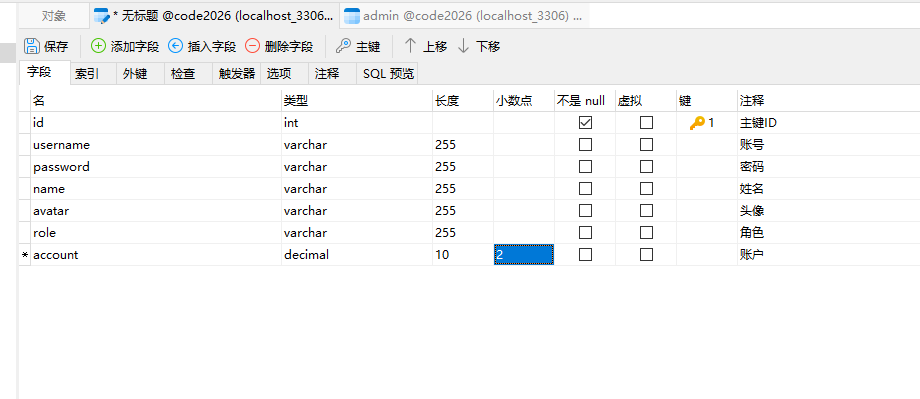
CREATE TABLE `user` (
  `id` int NOT NULL AUTO_INCREMENT COMMENT '主键ID',
  `username` varchar(255) COLLATE utf8mb4_unicode_ci DEFAULT NULL COMMENT '账号',
  `password` varchar(255) COLLATE utf8mb4_unicode_ci DEFAULT NULL COMMENT '密码',
  `name` varchar(255) COLLATE utf8mb4_unicode_ci DEFAULT NULL COMMENT '姓名',
  `avatar` varchar(255) COLLATE utf8mb4_unicode_ci DEFAULT NULL COMMENT '头像',
  `role` varchar(255) COLLATE utf8mb4_unicode_ci DEFAULT NULL COMMENT '角色',
  `account` decimal(10,2) DEFAULT NULL COMMENT '账户',
  PRIMARY KEY (`id`)
) ENGINE=InnoDB DEFAULT CHARSET=utf8mb4 COLLATE=utf8mb4_unicode_ci COMMENT='普通用户';
Vue 项目开发的基本方法
- 创建页面(views)
- 创建路由(router/index.js)
- 创建菜单(Manager.vue/ el-menu)
通过路由访问页面,例如:http://localhost:5173/manager/home
Element-Plus
https://element-plus.org/zh-CN/
Vue.js
页面设计
基本的增删改查页面分为 4 部分:
- 搜索区域
- 操作区域(新增数据)
- 表格区域(展示数据、编辑删除数据)
- 分页区域
数据绑定
<el-input v-model="data.name" placeholder="Type something" :prefix-icon="Search" />

<script setup>
  import { reactive } from "vue";
  const data = reactive({
    name: null
  })
</script>
导入图标
import { Search } from "@element-plus/icons-vue";
⭐表格分页展示数据(包括模糊查询)
数据库添加数据(造数据)
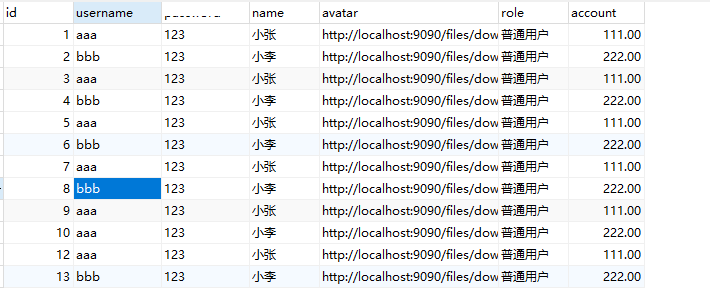
页面
<template>
  <div>
    <div class="card" style="margin-bottom: 5px">
      <el-input style="width: 300px" v-model="data.name" placeholder="请输入名称查询" :prefix-icon="Search" />
      <el-button @click="load" type="primary" style="margin-left: 10px">查询</el-button>
      <el-button @click="reset" type="info">重置</el-button>
    </div>

    <div class="card" style="margin-bottom: 5px">
      <div style="margin-bottom: 10px">
        <el-button @click="reset" type="primary">新增</el-button>
      </div>
      <div>
        <el-table :data="data.tableData" stripe style="width: 100%">
          <el-table-column prop="username" label="账号" />
          <el-table-column prop="name" label="姓名" />
          <el-table-column prop="role" label="角色" />
          <el-table-column prop="account" label="账户余额" />
          <el-table-column label="操作" width="180" fixed="right" >
            <el-button type="primary">编辑</el-button>
            <el-button type="danger">删除</el-button>
          </el-table-column>
        </el-table>
      </div>
    </div>

    <div class="card">
      <el-pagination background layout="total, prev, pager, next" :total="1" />
    </div>
  </div>
</template>

<script setup>
import { reactive } from "vue";
import { Search } from "@element-plus/icons-vue";

const data = reactive({
  name: null,
  tableData: [
    { username: 'aaa', name: '小张', role: '普通用户', account: 0 }
  ]
})

// 分页查询数据的函数
const load = () => {

}

const reset = () => {

}
</script>
请求数据
import request from "@/utils/request";
后台接口
user_name userName
- entity(实体类,跟数据库表对应上,Java 里面的字段是驼峰的风格,数据库里面是下划线)
- controller(接口层,跟前端交互,前端 vue 通过 axios 插件请求后端接口的数据)
- service(业务逻辑层,写一下判断的业务逻辑,也会做多个表的数据更新,service 会调用 mapper 层操作数据)
- mapper(数据接口层,全部都是接口方法,具体的实现在 xml 里面通过 sql 语句来实现)
- mapper.xml(具体的 sql 的实现,namespace 绑定到 mapper 数据接口层)
分页查询使用 pageHelper 插件
/**
 * 分页查询的方法
 */
public PageInfo<User> selectPage(Integer pageNum, Integer pageSize) {
    PageHelper.startPage(pageNum, pageSize);
    List<User> list = userMapper.selectAll();
    return PageInfo.of(list);
}
分页模糊查询的 SQL

完整的代码
User.java
package com.example.entity;

import java.math.BigDecimal;

public class User {
    private Integer id;
    private String username;
    private String password;
    private String name;
    private String role;
    private BigDecimal account;

    public Integer getId() {
        return id;
    }

    public void setId(Integer id) {
        this.id = id;
    }

    public String getUsername() {
        return username;
    }

    public void setUsername(String username) {
        this.username = username;
    }

    public String getPassword() {
        return password;
    }

    public void setPassword(String password) {
        this.password = password;
    }

    public String getName() {
        return name;
    }

    public void setName(String name) {
        this.name = name;
    }

    public String getRole() {
        return role;
    }

    public void setRole(String role) {
        this.role = role;
    }

    public BigDecimal getAccount() {
        return account;
    }

    public void setAccount(BigDecimal account) {
        this.account = account;
    }
}
UserController
package com.example.controller;

import com.example.common.Result;
import com.example.entity.User;
import com.example.service.UserService;
import com.github.pagehelper.PageInfo;
import jakarta.annotation.Resource;
import org.springframework.web.bind.annotation.GetMapping;
import org.springframework.web.bind.annotation.RequestMapping;
import org.springframework.web.bind.annotation.RequestParam;
import org.springframework.web.bind.annotation.RestController;

@RestController
@RequestMapping("/user")
public class UserController {

    @Resource
    private UserService userService;


    /**
     * @param pageNum 当前页码
     * @param pageSize 每页展示的个数
     * @return 分页数据
     * 接口的请求方式:http://localhost:9090/user/selectPage?pageNum=1&pageSize=10
     */
    @GetMapping("/selectPage")
    public Result selectPage(@RequestParam(defaultValue = "1") Integer pageNum,
                             @RequestParam(defaultValue = "10") Integer pageSize,
                             @RequestParam(required = false) String name) {
        PageInfo<User> pageInfo = userService.selectPage(pageNum, pageSize, name);
        return Result.success(pageInfo);
    }

}
UserService
package com.example.service;

import com.example.entity.User;
import com.example.mapper.UserMapper;
import com.github.pagehelper.PageHelper;
import com.github.pagehelper.PageInfo;
import jakarta.annotation.Resource;
import org.springframework.stereotype.Service;

import java.util.List;

@Service
public class UserService {

    @Resource
    private UserMapper userMapper;

    /**
     * 分页查询的方法
     */
    public PageInfo<User> selectPage(Integer pageNum, Integer pageSize, String name) {
        PageHelper.startPage(pageNum, pageSize);
        List<User> list = userMapper.selectAll(name);
        return PageInfo.of(list);
    }

}
UserMapper
package com.example.mapper;

import com.example.entity.User;

import java.util.List;

public interface UserMapper {

    List<User> selectAll(String name);

}
UserMapper.xml
<?xml version="1.0" encoding="UTF-8"?>
<!DOCTYPE mapper
        PUBLIC "-//mybatis.org//DTD Mapper 3.0//EN"
        "http://mybatis.org/dtd/mybatis-3-mapper.dtd">
<mapper namespace="com.example.mapper.UserMapper">

    <select id="selectAll" resultType="com.example.entity.User">
        select * from `user`
        <where>
            <if test="name != null">name like concat('%', #{name}, '%')</if>
        </where>
    </select>

</mapper>
User.vue
<template>
  <div>
    <div class="card" style="margin-bottom: 5px">
      <el-input style="width: 300px" v-model="data.name" placeholder="请输入名称查询" :prefix-icon="Search" />
      <el-button @click="load" type="primary" style="margin-left: 10px">查询</el-button>
      <el-button @click="reset" type="info">重置</el-button>
    </div>

    <div class="card" style="margin-bottom: 5px">
      <div style="margin-bottom: 10px">
        <el-button @click="reset" type="primary">新增</el-button>
      </div>
      <div>
        <el-table :data="data.tableData" stripe style="width: 100%">
          <el-table-column prop="username" label="账号" />
          <el-table-column prop="name" label="姓名" />
          <el-table-column prop="role" label="角色" />
          <el-table-column prop="account" label="账户余额" />
          <el-table-column label="操作" width="180" fixed="right" >
            <el-button type="primary">编辑</el-button>
            <el-button type="danger">删除</el-button>
          </el-table-column>
        </el-table>
      </div>
    </div>

    <div class="card">
      <el-pagination v-model:current-page="data.pageNum" v-model:page-size="data.pageSize"
                     @current-change="load" background layout="total, prev, pager, next" :total="data.total" />
    </div>
  </div>
</template>

<script setup>
import { reactive } from "vue";
import { Search } from "@element-plus/icons-vue";
import request from "@/utils/request";
import {ElMessage} from "element-plus";

const data = reactive({
  name: null,
  tableData: [],
  total: 0,
  pageNum: 1,
  pageSize: 5
})

// 分页查询数据的函数
const load = () => {
  request.get('/user/selectPage', {
    params: {
      pageNum: data.pageNum,
      pageSize: data.pageSize,
      name: data.name
    }
  }).then(res => {
    if (res.code === '200') {
      data.tableData = res.data?.list
      data.total = res.data?.total
    } else {
      ElMessage.error(res.msg)
    }
  })
}
load()

const reset = () => {
  data.name = null
  load()
}
</script>
⭐删除数据
页面按钮
<el-table-column label="操作" width="180" fixed="right" >
  <template #default="scope">
    <el-button type="danger" @click="del(scope.row.id)">删除</el-button>
  </template>
</el-table-column>

import {ElMessage, ElMessageBox} from "element-plus";

const del = (id) => {
  ElMessageBox.confirm('您确定删除吗?', '删除确认', { type: 'warning' }).then(res => {
    request.delete('/user/delete/' + id).then(res => {
      if (res.code === '200') {
        ElMessage.success('操作成功')
        load()
      } else {
        ElMessage.error(res.msg)
      }
    })
  }).catch(err => {})
}
后台接口
删除接口
/**
 * 删除数据
 * 接口路径:/user/delete/1
 */
@DeleteMapping("/delete/{id}")
public Result delete(@PathVariable Integer id) {
    userService.deleteById(id);
    return Result.success();
}
删除的 sql
<delete id="deleteById">
    delete from `user` where id = #{id}
</delete>