06. 开发商品信息管理功能
SQL
CREATE TABLE `goods` (
  `id` int NOT NULL AUTO_INCREMENT COMMENT '主键ID',
  `name` varchar(255) CHARACTER SET utf8mb4 COLLATE utf8mb4_unicode_ci DEFAULT NULL COMMENT '名称',
  `img` varchar(255) CHARACTER SET utf8mb4 COLLATE utf8mb4_unicode_ci DEFAULT NULL COMMENT '图片',
  `price` decimal(10,2) DEFAULT NULL COMMENT '价格',
  `description` varchar(255) CHARACTER SET utf8mb4 COLLATE utf8mb4_unicode_ci DEFAULT NULL COMMENT '简介',
  `content` longtext CHARACTER SET utf8mb4 COLLATE utf8mb4_unicode_ci COMMENT '详情',
  `store` int DEFAULT '0' COMMENT '库存',
  `category_id` int DEFAULT NULL COMMENT '分类ID',
  `status` varchar(255) CHARACTER SET utf8mb4 COLLATE utf8mb4_unicode_ci DEFAULT NULL COMMENT '上架状态',
  `views` int DEFAULT NULL COMMENT '浏览量',
  `sale_count` int DEFAULT NULL COMMENT '销量',
  `time` varchar(255) CHARACTER SET utf8mb4 COLLATE utf8mb4_unicode_ci DEFAULT NULL COMMENT '创建时间',
  PRIMARY KEY (`id`)
) ENGINE=InnoDB DEFAULT CHARSET=utf8mb4 COLLATE=utf8mb4_unicode_ci COMMENT='商品信息';
开发后端接口
Goods.java
package com.example.entity;

import java.math.BigDecimal;

public class Goods {

    /**主键ID */
    private Integer id;
    /**名称 */
    private String name;
    /**图片 */
    private String img;
    /**价格 */
    private BigDecimal price;
    /**简介 */
    private String description;
    /**详情 */
    private String content;
    /**库存 */
    private Integer store;
    /**分类ID */
    private Integer categoryId;
    private String categoryName;
    /**上架状态 */
    private String status;
    /**浏览量 */
    private Integer views;
    /**销量 */
    private Integer saleCount;
    /**创建时间 */
    private String time;

    public String getCategoryName() {
        return categoryName;
    }

    public void setCategoryName(String categoryName) {
        this.categoryName = categoryName;
    }

    public Integer getId() {
        return id;
    }

    public void setId(Integer id) {
        this.id = id;
    }

    public String getName() {
        return name;
    }

    public void setName(String name) {
        this.name = name;
    }

    public String getImg() {
        return img;
    }

    public void setImg(String img) {
        this.img = img;
    }

    public BigDecimal getPrice() {
        return price;
    }

    public void setPrice(BigDecimal price) {
        this.price = price;
    }

    public String getDescription() {
        return description;
    }

    public void setDescription(String description) {
        this.description = description;
    }

    public String getContent() {
        return content;
    }

    public void setContent(String content) {
        this.content = content;
    }

    public Integer getStore() {
        return store;
    }

    public void setStore(Integer store) {
        this.store = store;
    }

    public Integer getCategoryId() {
        return categoryId;
    }

    public void setCategoryId(Integer categoryId) {
        this.categoryId = categoryId;
    }

    public String getStatus() {
        return status;
    }

    public void setStatus(String status) {
        this.status = status;
    }

    public Integer getViews() {
        return views;
    }

    public void setViews(Integer views) {
        this.views = views;
    }

    public Integer getSaleCount() {
        return saleCount;
    }

    public void setSaleCount(Integer saleCount) {
        this.saleCount = saleCount;
    }

    public String getTime() {
        return time;
    }

    public void setTime(String time) {
        this.time = time;
    }
}
GoodsMapper.xml
<?xml version="1.0" encoding="UTF-8"?>
<!DOCTYPE mapper
        PUBLIC "-//mybatis.org//DTD Mapper 3.0//EN"
        "http://mybatis.org/dtd/mybatis-3-mapper.dtd">
<mapper namespace="com.example.mapper.GoodsMapper">

    <select id="selectAll" resultType="com.example.entity.Goods">
        select `goods`.*, category.name as categoryName from `goods`
        left join category on `goods`.category_id = category.id
        <where>
            <if test="name != null"> and `goods`.name like concat('%', #{name}, '%')</if>
            <if test="categoryId != null"> and `goods`.category_id = #{categoryId}</if>
        </where>
        order by `goods`.id desc
    </select>

    <select id="selectById" resultType="com.example.entity.Goods">
        select * from `goods` where id = #{id}
    </select>

    <delete id="deleteById">
        delete from `goods` where id = #{id}
    </delete>

    <insert id="insert" parameterType="com.example.entity.Goods" useGeneratedKeys="true">
        insert into `goods`
        <trim prefix="(" suffix=")" suffixOverrides=",">
            <if test="id != null">id,</if>
            <if test="name != null">name,</if>
            <if test="img != null">img,</if>
            <if test="price != null">price,</if>
            <if test="description != null">description,</if>
            <if test="content != null">content,</if>
            <if test="store != null">store,</if>
            <if test="categoryId != null">category_id,</if>
            <if test="status != null">status,</if>
            <if test="views != null">views,</if>
            <if test="saleCount != null">sale_count,</if>
            <if test="time != null">time,</if>
        </trim>
        values
        <trim prefix="(" suffix=")" suffixOverrides=",">
            <if test="id != null">#{id},</if>
            <if test="name != null">#{name},</if>
            <if test="img != null">#{img},</if>
            <if test="price != null">#{price},</if>
            <if test="description != null">#{description},</if>
            <if test="content != null">#{content},</if>
            <if test="store != null">#{store},</if>
            <if test="categoryId != null">#{categoryId},</if>
            <if test="status != null">#{status},</if>
            <if test="views != null">#{views},</if>
            <if test="saleCount != null">#{saleCount},</if>
            <if test="time != null">#{time},</if>
        </trim>
    </insert>

    <update id="updateById" parameterType="com.example.entity.Goods">
        update `goods`
        <set>
            <if test="id != null">
                id = #{id},
            </if>
            <if test="name != null">
                name = #{name},
            </if>
            <if test="img != null">
                img = #{img},
            </if>
            <if test="price != null">
                price = #{price},
            </if>
            <if test="description != null">
                description = #{description},
            </if>
            <if test="content != null">
                content = #{content},
            </if>
            <if test="store != null">
                store = #{store},
            </if>
            <if test="categoryId != null">
                category_id = #{categoryId},
            </if>
            <if test="status != null">
                status = #{status},
            </if>
            <if test="views != null">
                views = #{views},
            </if>
            <if test="saleCount != null">
                sale_count = #{saleCount},
            </if>
            <if test="time != null">
                time = #{time},
            </if>
        </set>
        where id = #{id}
    </update>

</mapper>
GoosService 新增接口默认数据
/**
 * 新增
 */
public void add(Goods goods) {
    goods.setViews(0);
    goods.setSaleCount(0);
    String now = DateUtil.now();  // 2025-11-18 16:20:00
    goods.setTime(now);
    goodsMapper.insert(goods);
}
开发前端页面
Element-Plus 组件宝库
https://www.yuque.com/xiaqing-en2ii/skflxg/hzi02h8qfizne3yv
富文本插件
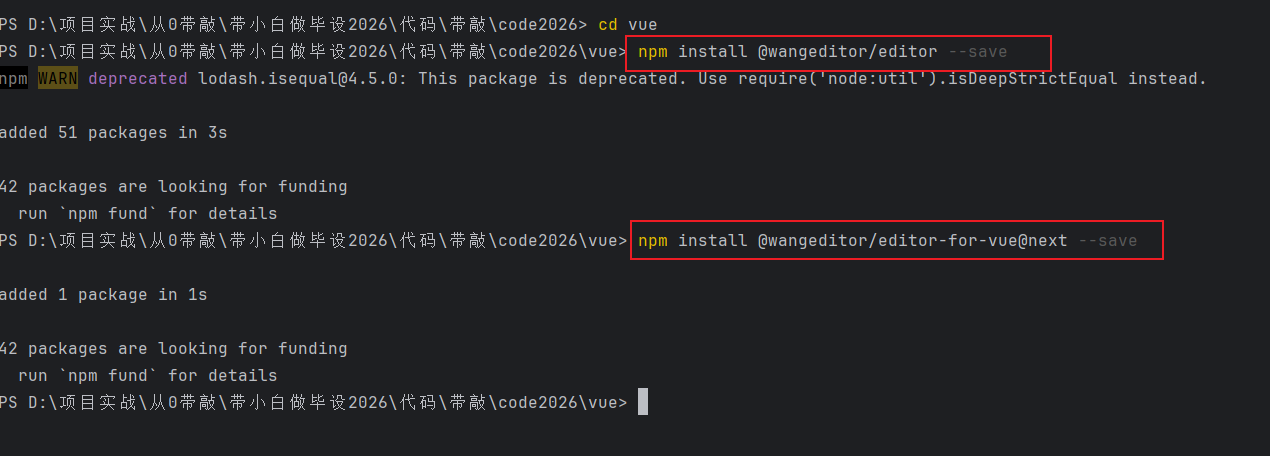
wangeditor
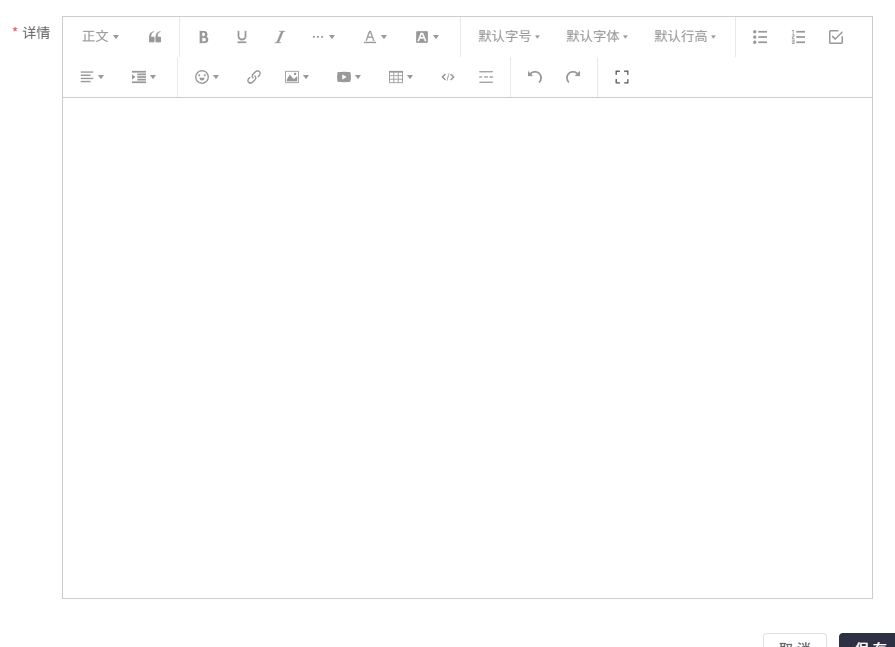
弹窗的样式:
富文本单独的文件上传接口
package com.example.controller;

import cn.hutool.core.collection.CollUtil;
import cn.hutool.core.io.FileUtil;
import cn.hutool.core.lang.Dict;
import com.example.common.Result;
import jakarta.servlet.ServletOutputStream;
import jakarta.servlet.http.HttpServletResponse;
import org.springframework.beans.factory.annotation.Value;
import org.springframework.web.bind.annotation.*;
import org.springframework.web.multipart.MultipartFile;

import java.io.IOException;
import java.net.URLEncoder;
import java.nio.charset.StandardCharsets;
import java.util.HashMap;
import java.util.Map;

/**
 * 文件相关操作接口
 */
@RestController
@RequestMapping("/files")
public class FileController {

    // 表示本地磁盘文件的存储路径
    private static final String filePath = System.getProperty("user.dir") + "/files/";

    @Value("${fileBaseUrl}")
    private String fileBaseUrl;

    @Value("${server.port}")
    private String port;

    /**
     * 文件上传
     */
    @PostMapping("/upload")
    public Result upload(MultipartFile file) {
        // 定义文件的唯一标识
        String fileName = System.currentTimeMillis() + "-" + file.getOriginalFilename();
        // 拼接完整的文件存储路径
        String realFilePath = filePath + fileName;
        try {
            if (!FileUtil.isDirectory(filePath)) {
                FileUtil.mkdir(filePath);
            }
            FileUtil.writeBytes(file.getBytes(), realFilePath);
        } catch (IOException e) {
            System.out.println("文件上传错误");
        }

        // 返回文件下载的地址
        String url = fileBaseUrl + ":" + port + "/files/download/" + fileName;
        return Result.success(url);
    }

    /**
     * 文件下载
     */
    @GetMapping("/download/{fileName}")
    public void download(@PathVariable String fileName, HttpServletResponse response) {
        // 设置下载文件http响应头
        response.setHeader("Content-Disposition", "attachment;filename=" + URLEncoder.encode(fileName, StandardCharsets.UTF_8));
        // 拼接完整的文件存储路径
        String realFilePath = filePath + fileName;
        try {
            // 通过文件的存储路径拿到文件字节数组
            byte[] bytes = FileUtil.readBytes(realFilePath);
            ServletOutputStream os = response.getOutputStream();
            // 将文件字节数组写出到文件流
            os.write(bytes);
            os.flush();
            os.close();
        } catch (IOException e) {
            System.out.println("文件下载错误");
        }
    }

    /**
     * wang-editor编辑器文件上传接口
     */
    @PostMapping("/wang/upload")
    public Map<String, Object> wangEditorUpload(MultipartFile file) {
        String flag = System.currentTimeMillis() + "";
        String fileName = file.getOriginalFilename();
        try {
            // 文件存储形式:时间戳-文件名
            FileUtil.writeBytes(file.getBytes(), filePath + flag + "-" + fileName);
            System.out.println(fileName + "--上传成功");
            Thread.sleep(1L);
        } catch (Exception e) {
            System.err.println(fileName + "--文件上传失败");
        }
        String http = fileBaseUrl + ":" + port  + "/files/download/";
        Map<String, Object> resMap = new HashMap<>();
        // wangEditor上传图片成功后, 需要返回的参数
        resMap.put("errno", 0);
        resMap.put("data", CollUtil.newArrayList(Dict.create().set("url", http + flag + "-" + fileName)));
        return resMap;
    }

}
Goods.vue
<template>
  <div>

    <div class="card" style="margin-bottom: 5px;">
      <el-input v-model="data.name" style="width: 300px; margin-right: 10px" placeholder="请输入名称查询"></el-input>
      <el-select style="width: 300px; margin-right: 10px" v-model="data.categoryId" placeholder="请选择商品分类">
        <el-option v-for="item in data.categoryList" :key="item.id" :value="item.id" :label="item.name"></el-option>
      </el-select>
      <el-button type="primary" @click="load">查询</el-button>
      <el-button type="info" style="margin: 0 10px" @click="reset">重置</el-button>
    </div>

    <div class="card" style="margin-bottom: 5px">
      <div style="margin-bottom: 10px">
        <el-button type="primary" @click="handleAdd">新增</el-button>
      </div>
      <el-table tooltip-effect="dark myEff" :data="data.tableData" stripe>
        <el-table-column prop="name" label="名称" show-overflow-tooltip></el-table-column>
        <el-table-column prop="img" label="图片">
          <template #default="scope">
            <el-image v-if="scope.row.img" :src="scope.row.img" :preview-src-list="[scope.row.img]" preview-teleported style="width: 100px; height: 100px;"></el-image>
          </template>
        </el-table-column>
        <el-table-column prop="price" label="价格"></el-table-column>
        <el-table-column prop="description" label="简介" show-overflow-tooltip></el-table-column>
        <el-table-column prop="content" label="详情">
          <template #default="scope">
            <el-button type="primary" @click="view(scope.row.content)">查看详情</el-button>
          </template>
        </el-table-column>
        <el-table-column prop="store" label="库存"></el-table-column>
        <el-table-column prop="categoryName" label="分类名称"></el-table-column>
        <el-table-column prop="status" label="上架状态"></el-table-column>
        <el-table-column prop="views" label="浏览量"></el-table-column>
        <el-table-column prop="saleCount" label="销量"></el-table-column>
        <el-table-column prop="time" label="创建时间"></el-table-column>

        <el-table-column label="操作" align="center" width="160">
          <template #default="scope">
            <el-button type="primary" @click="handleEdit(scope.row)">编辑</el-button>
            <el-button type="danger" @click="handleDelete(scope.row.id)">删除</el-button>
          </template>
        </el-table-column>
      </el-table>
    </div>

    <div class="card">
      <el-pagination @current-change="load" background layout="total, prev, pager, next" v-model:page-size="data.pageSize" v-model:current-page="data.pageNum" :total="data.total"/>
    </div>

    <el-dialog title="商品信息" width="50%" v-model="data.formVisible" :close-on-click-modal="false" destroy-on-close>
      <el-form ref="formRef" :model="data.form" :rules="data.rules" label-width="80px" style="padding-right: 30px; padding-top: 20px">
        <el-form-item prop="name" label="名称">
          <el-input v-model="data.form.name" placeholder="请输入名称"></el-input>
        </el-form-item>
        <el-form-item prop="img" label="图片">
          <el-upload :action="uploadUrl" list-type="picture" :on-success="handleImgSuccess">
            <el-button type="primary">上传图片</el-button>
          </el-upload>
        </el-form-item>
        <el-form-item prop="price" label="价格">
          <el-input-number :min="0" v-model="data.form.price" placeholder="请输入价格"></el-input-number>
        </el-form-item>
        <el-form-item prop="description" label="简介">
          <el-input type="textarea" :rows="3" v-model="data.form.description" placeholder="请输入简介"></el-input>
        </el-form-item>

        <el-form-item prop="store" label="库存">
          <el-input v-model="data.form.store" placeholder="请输入库存"></el-input>
        </el-form-item>
        <el-form-item prop="categoryId" label="分类">
          <el-select style="width: 100%" v-model="data.form.categoryId">
            <el-option v-for="item in data.categoryList" :key="item.id" :value="item.id" :label="item.name"></el-option>
          </el-select>
        </el-form-item>
        <el-form-item prop="status" label="上架状态">
          <el-radio-group v-model="data.form.status">
            <el-radio-button label="上架" value="上架"></el-radio-button>
            <el-radio-button label="下架" value="下架"></el-radio-button>
          </el-radio-group>
        </el-form-item>
        <el-form-item prop="content" label="详情">
          <div style="border: 1px solid #ccc; width: 100%">
            <Toolbar
                style="border-bottom: 1px solid #ccc"
                :editor="editorRef"
                :mode="mode"
            />
            <Editor
                style="height: 500px; overflow-y: hidden;"
                v-model="data.form.content"
                :mode="mode"
                :defaultConfig="editorConfig"
                @onCreated="handleCreated"
            />
          </div>
        </el-form-item>

      </el-form>
      <template #footer>
      <span class="dialog-footer">
        <el-button @click="data.formVisible = false">取 消</el-button>
        <el-button type="primary" @click="save">保 存</el-button>
      </span>
      </template>
    </el-dialog>

    <el-dialog title="商品详情" v-model="data.viewVisible" width="50%" :close-on-click-modal="false" destroy-on-close>
      <div class="editor-content-view" style="padding: 20px" v-html="data.content"></div>
      <template #footer>
    <span class="dialog-footer">
      <el-button @click="data.viewVisible = false">关 闭</el-button>
    </span>
      </template>
    </el-dialog>

  </div>
</template>

<script setup>
import request from "@/utils/request";
import {reactive, ref} from "vue";
import {ElMessageBox, ElMessage} from "element-plus";
import '@wangeditor/editor/dist/css/style.css' // 引入 css
import {onBeforeUnmount, shallowRef} from "vue";
import { Editor, Toolbar } from '@wangeditor/editor-for-vue'

const uploadUrl = import.meta.env.VITE_BASE_URL + '/files/upload'
const formRef = ref()
const data = reactive({
  pageNum: 1,
  pageSize: 10,
  total: 0,
  formVisible: false,
  form: {},
  tableData: [],
  categoryList: [],
  name: null,
  categoryId: null,
  viewVisible: false,
  content: null,
  rules: {
    name: [
      { required: true, message: '请输入名称', trigger: 'blur' }
    ],
    img: [
      { required: true, message: '请输入图片', trigger: 'blur' }
    ],
    price: [
      { required: true, message: '请输入价格', trigger: 'blur' }
    ],
    description: [
      { required: true, message: '请输入简介', trigger: 'blur' }
    ],
    content: [
      { required: true, message: '请输入详情', trigger: 'blur' }
    ],
    store: [
      { required: true, message: '请输入库存', trigger: 'blur' }
    ],
    categoryId: [
      { required: true, message: '请输入分类ID', trigger: 'change' }
    ]
  }
})


/* wangEditor5 初始化开始 */
const baseUrl = import.meta.env.VITE_BASE_URL
const editorRef = shallowRef()  // 编辑器实例,必须用 shallowRef
const mode = 'default'
const editorConfig = { MENU_CONF: {} }
// 图片上传配置
editorConfig.MENU_CONF['uploadImage'] = {
  server: baseUrl + '/files/wang/upload',  // 服务端图片上传接口
  fieldName: 'file'  // 服务端图片上传接口参数
}
// 组件销毁时,也及时销毁编辑器,否则可能会造成内存泄漏
onBeforeUnmount(() => {
  const editor = editorRef.value
  if (editor == null) return
  editor.destroy()
})
// 记录 editor 实例,重要!
const handleCreated = (editor) => {
  editorRef.value = editor
}
/* wangEditor5 初始化结束 */

const view = (content) => {
  data.content = content
  data.viewVisible = true
}

// 处理文件上传的钩子
const handleImgSuccess = (res) => {
  data.form.img = res.data  // res.data就是文件上传返回的文件路径,获取到路径后赋值表单的属性
}

request.get('/category/selectAll').then(res => {
  data.categoryList = res.data
})


// 分页查询
const load = () => {
  request.get('/goods/selectPage', {
    params: {
      pageNum: data.pageNum,
      pageSize: data.pageSize,
      name: data.name,
      categoryId: data.categoryId
    }
  }).then(res => {
    data.tableData = res.data?.list
    data.total = res.data?.total
  })
}
load()

// 新增
const handleAdd = () => {
  data.form = { status: '上架', price: 0 }
  data.formVisible = true
}

// 编辑
const handleEdit = (row) => {
  data.form = JSON.parse(JSON.stringify(row))
  data.formVisible = true
}

// 新增保存
const add = () => {
  request.post('/goods/add', data.form).then(res => {
    if (res.code === '200') {
      load()
      ElMessage.success('操作成功')
      data.formVisible = false
    } else {
      ElMessage.error(res.msg)
    }
  })
}

// 编辑保存
const update = () => {
  request.put('/goods/update', data.form).then(res => {
    if (res.code === '200') {
      load()
      ElMessage.success('操作成功')
      data.formVisible = false
    } else {
      ElMessage.error(res.msg)
    }
  })
}

// 弹窗保存
const save = () => {
  formRef.value.validate(valid => {
    if (valid) {
      // data.form有id就是更新,没有就是新增
      data.form.id ? update() : add()
    }
  })
}

// 删除
const handleDelete = (id) => {
  ElMessageBox.confirm('删除后数据无法恢复,您确定删除吗?', '删除确认', { type: 'warning' }).then(res => {
    request.delete('/goods/delete/' + id).then(res => {
      if (res.code === '200') {
        load()
        ElMessage.success('操作成功')
      } else {
        ElMessage.error(res.msg)
      }
    })
  }).catch(err => {})
}

// 重置
const reset = () => {
  data.name = null
  data.categoryId = null
  load()
}
</script>