13. 开发餐品管理功能.
效果图
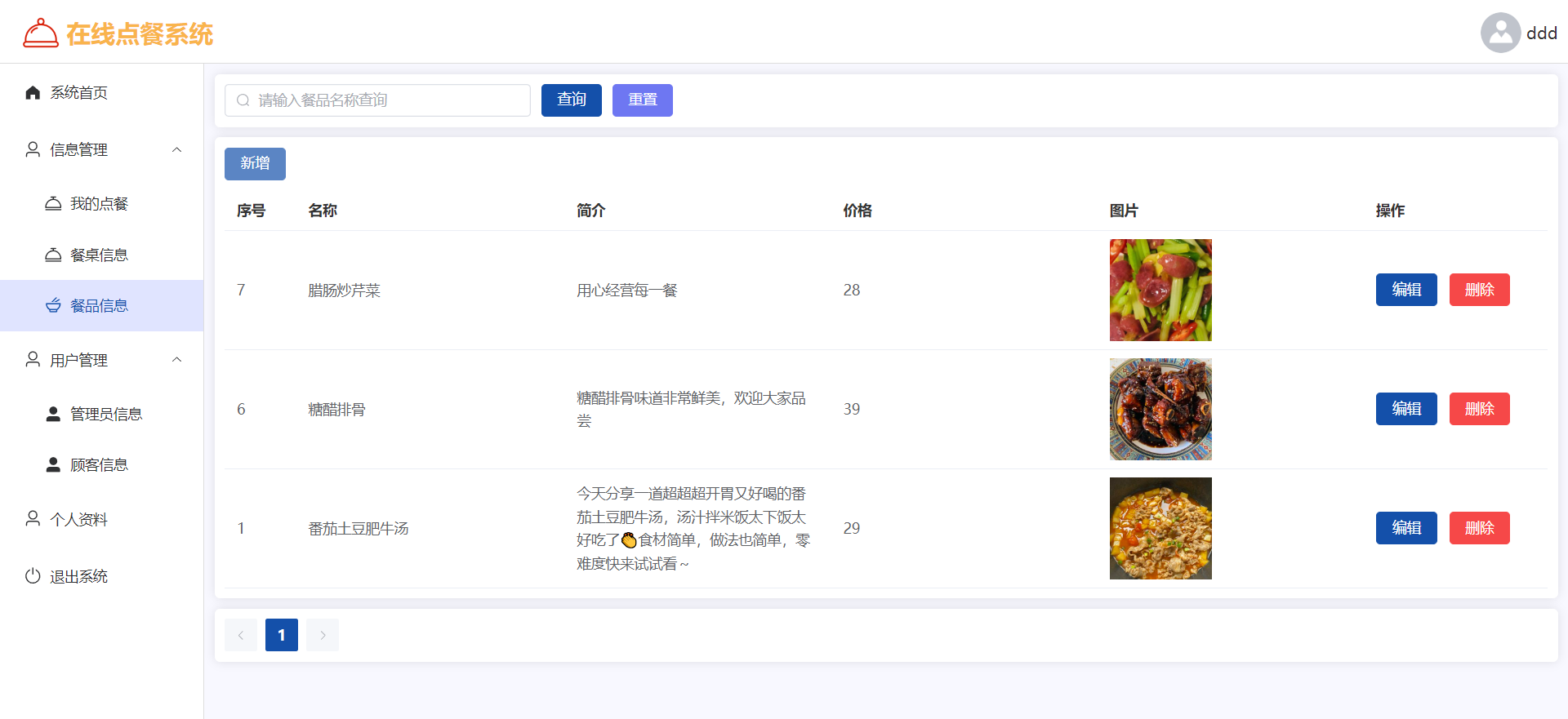
SQL
CREATE TABLE `foods` (
  `id` int(11) NOT NULL AUTO_INCREMENT COMMENT 'ID',
  `name` varchar(255) COLLATE utf8mb4_unicode_ci DEFAULT NULL COMMENT '名称',
  `descr` varchar(255) COLLATE utf8mb4_unicode_ci DEFAULT NULL COMMENT '餐品简介',
  `price` decimal(10,2) DEFAULT NULL COMMENT '价格',
  `img` varchar(255) COLLATE utf8mb4_unicode_ci DEFAULT NULL COMMENT '图片',
  PRIMARY KEY (`id`)
) ENGINE=InnoDB DEFAULT CHARSET=utf8mb4 COLLATE=utf8mb4_unicode_ci;
开发餐品信息后台管理
FoodsMapper.xml
<?xml version="1.0" encoding="UTF-8" ?>
<!DOCTYPE mapper
        PUBLIC "-//mybatis.org//DTD Mapper 3.0//EN"
        "http://mybatis.org/dtd/mybatis-3-mapper.dtd">
<mapper namespace="com.example.mapper.FoodsMapper">

    <insert id="insert">
        insert into foods (name, descr, price, img)
        values (#{name}, #{descr}, #{price}, #{img})
    </insert>


    <update id="updateById">
        update foods
        <set>
            <if test="name != null">name = #{name},</if>
            <if test="descr != null">descr = #{descr},</if>
            <if test="price != null">price = #{price},</if>
            <if test="img != null">img = #{img},</if>
        </set>
        where id = #{id}
    </update>

    <delete id="deleteById">
        delete
        from foods
        where id = #{id}
    </delete>

    <select id="selectAll" resultType="com.example.entity.Foods">
        select foods.* from foods
        <where>
            <if test="name != null">
                foods.name like concat('%', #{name}, '%')
            </if>
        </where>
        order by id desc
    </select>


</mapper>
FoodsController
package com.example.controller;

import com.example.common.Result;
import com.example.entity.Foods;
import com.example.service.FoodsService;
import com.github.pagehelper.PageInfo;
import jakarta.annotation.Resource;
import org.springframework.web.bind.annotation.*;

import java.util.List;

@RestController
@RequestMapping("/foods")
public class FoodsController {

    @Resource
    FoodsService foodsService;

    /**
     * 新增
     */
    @PostMapping("/add")
    public Result add(@RequestBody Foods foods) {
        foodsService.add(foods);
        return Result.success();
    }

    /**
     * 删除
     */
    @DeleteMapping("/delete/{id}")
    public Result delete(@PathVariable Integer id) {
        foodsService.deleteById(id);
        return Result.success();
    }

    /**
     * 批量删除
     */
    @DeleteMapping("/delete/batch")
    public Result delete(@RequestBody List<Integer> ids) {
        foodsService.deleteBatch(ids);
        return Result.success();
    }

    /**
     * 更新
     */
    @PutMapping("/update")
    public Result update(@RequestBody Foods foods) {
        foodsService.updateById(foods);
        return Result.success();
    }

    /**
     * 查询单个
     */
    @GetMapping("/selectById/{id}")
    public Result selectById(@PathVariable Integer id) {
        Foods foods = foodsService.selectById(id);
        return Result.success(foods);
    }

    /**
     * 查询所有
     */
    @GetMapping("/selectAll")
    public Result selectAll(String name) {
        List<Foods> list = foodsService.selectAll(name);
        return Result.success(list);
    }

    /**
     * 查询所有
     */
    @GetMapping("/selectPage")
    public Result selectPage(
            String name,
            @RequestParam(defaultValue = "1") Integer pageNum,
            @RequestParam(defaultValue = "10") Integer pageSize) {
        PageInfo<Foods> pageInfo = foodsService.selectPage(name, pageNum, pageSize);
        return Result.success(pageInfo);
    }

}
开发前台Vue
table
<el-table :data="data.tableData">
  <el-table-column prop="id" label="序号" width="70"/>
  <el-table-column prop="name" label="名称"/>
  <el-table-column prop="descr" label="简介"/>
  <el-table-column prop="price" label="价格"/>
  <el-table-column label="图片">
    <template v-slot="scope">
      <el-image style="width: 100px; height: 100px; display: block" v-if="scope.row.img" :src="scope.row.img" :preview-src-list="[scope.row.img]" preview-teleported></el-image>
    </template>
  </el-table-column>
  <el-table-column label="操作" width="180">
    <template #default="scope">
      <el-button type="primary" @click="handleEdit(scope.row)">编辑</el-button>
      <el-button type="danger" @click="del(scope.row.id)">删除</el-button>
    </template>
  </el-table-column>
</el-table>
form
<el-form :model="data.form" label-width="100px" style="padding-right: 50px">
  <el-form-item label="名称">
    <el-input v-model="data.form.name" autocomplete="off" />
  </el-form-item>
  <el-form-item label="简介">
    <el-input type="textarea" v-model="data.form.descr" autocomplete="off" />
  </el-form-item>
  <el-form-item label="价格">
    <el-input v-model="data.form.price" autocomplete="off" />
  </el-form-item>
  <el-form-item label="图片">
    <el-upload action="http://localhost:9090/files/upload" :on-success="handleFileUpload">
      <el-button type="primary">点击上传</el-button>
    </el-upload>
  </el-form-item>
</el-form>