08. 开发用户端物品展示功能
给物品加上分类 ID
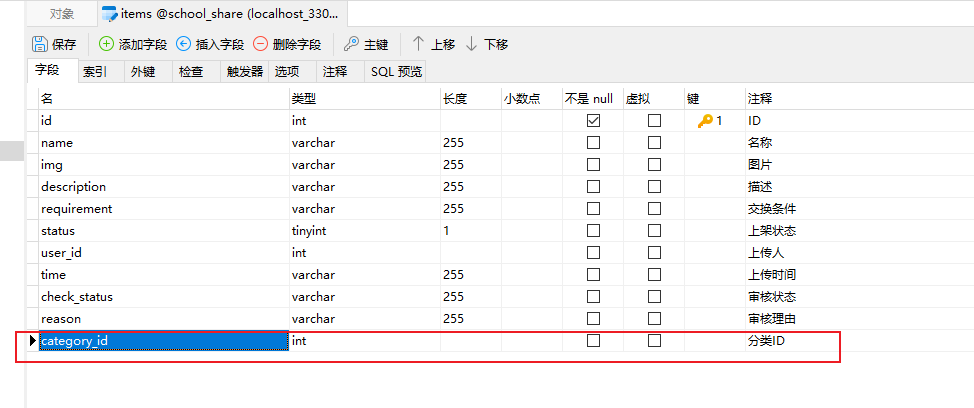
新增物品加上分类 ID
<el-form-item label="分类" prop="name">
  <el-select v-model="data.form.categoryId">
    <el-option v-for="item in data.categoryList" :key="item.id" :label="item.name" :value="item.id"></el-option>
  </el-select>
</el-form-item>
物品查询加上 status 条件 以及分类的连表查询
<select id="selectAll" resultType="com.example.entity.Items">
    select items.*, user.name as userName, category.name as categoryName from `items`
    left join user on items.user_id = user.id
    left join category on items.category_id = category.id
    <where>
        <if test="name != null"> and items.name like concat('%', #{name}, '%')</if>
        <if test="userId != null"> and items.user_id = #{userId}</if>
        <if test="status != null"> and items.status = #{status}</if>
        <if test="categoryId != null"> and items.category_id = #{categoryId}</if>
        <if test="checkStatus != null"> and items.check_status = #{checkStatus}</if>
    </where>
    order by items.id desc
</select>
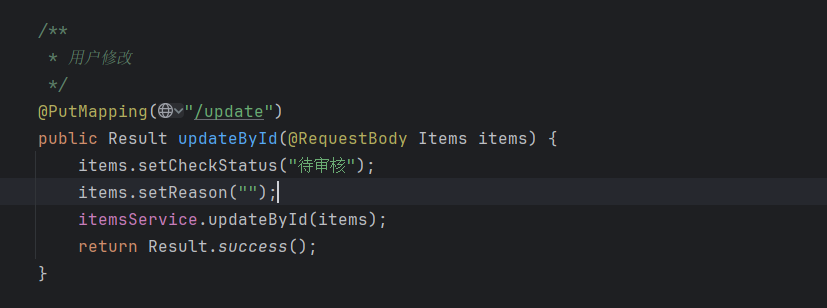
物品修改的接口
本节课的前端代码 ItemsView.vue
<template>
  <div>
    <div class="card" style="margin-bottom: 10px">
      <el-button @click="changeCategoryItem(null)" :type="data.categoryId === null ? 'primary' : 'default'">全部</el-button>
      <el-button @click="changeCategoryItem(item.id)" :type="data.categoryId === item.id ? 'primary' : 'default'" v-for="item in data.categoryList" :key="item.id">{{ item.name }}</el-button>
    </div>

    <div v-if="data.total > 0">
      <el-row :gutter="10">
       <el-col :span="6" v-for="item in data.tableData" :key="item.id">
         <div class="card" style="padding: 0">
           <img :src="item.img" alt="" style="width: 100%; height:350px; display: block; border-radius: 5px 5px 0 0">
           <div style="padding: 10px">
             <div style="margin: 10px 0; font-size: 20px; font-weight: 400">物品:{{ item.name }}</div>
             <div class="ellipsis2" style="margin: 10px 0; text-align: justify; color: #666;" ><span style="color: #333">描述信息:</span>{{ item.description }}</div>
             <div class="ellipsis2" style="margin: 10px 0; text-align: justify; color: #666;" ><span style="color: #333">交换条件:</span>{{ item.requirement }}</div>
             <div style="margin: 10px 0; display: flex; color: #666">
               <div style="flex: 1"><span style="color: #333">上传人:</span>{{item.userName}}</div>
               <div><span style="color: #333">上传时间:</span>{{ item.time }}</div>
             </div>
             <div style="text-align: right">
               <el-button type="primary" :disabled="item.userId === data.user.id">申请交换</el-button>
             </div>
           </div>
         </div>
       </el-col>
      </el-row>
    </div>

    <div v-else>
      <div class="card" style="padding: 50px; display: flex; justify-content: center; align-items: center; font-size: 20px; color: #666">暂无物品...</div>
    </div>
  </div>
</template>

<script setup>
import { reactive } from "vue";
import request from "@/utils/request";
import {ElMessage} from "element-plus";

const data = reactive({
  user: JSON.parse(localStorage.getItem('system-user') || '{}'),
  categoryList: [],
  categoryId: null,  // 当前选中的分类ID
  pageNum: 1,
  pageSize: 10,
  total: 0,
  tableData: [],
})

// 查询分类数据
request.get('/category/selectAll').then(res => {
  data.categoryList = res.data
})

const changeCategoryItem = (categoryId) => {
  data.categoryId = categoryId
  load()
}

// 分页查询
const load = () => {
  request.get('/items/selectPage', {
    params: {
      pageNum: data.pageNum,
      pageSize: data.pageSize,
      status: true,
      checkStatus: '通过',
      categoryId: data.categoryId
    }
  }).then(res => {
    if (res.code === '500') {
      ElMessage.error(res.msg)
      return
    }
    data.tableData = res.data?.list
    data.total = res.data?.total
  })
}
load()
</script>

<style>
.ellipsis2 {
  word-break: break-all;
  text-overflow: ellipsis;
  display: -webkit-box;
  -webkit-box-orient: vertical;
  -webkit-line-clamp: 1; /* 超出几行省略 */
  overflow: hidden;
}
</style>