14. 开发电影评论功能

筛选短评和长评的分页数据
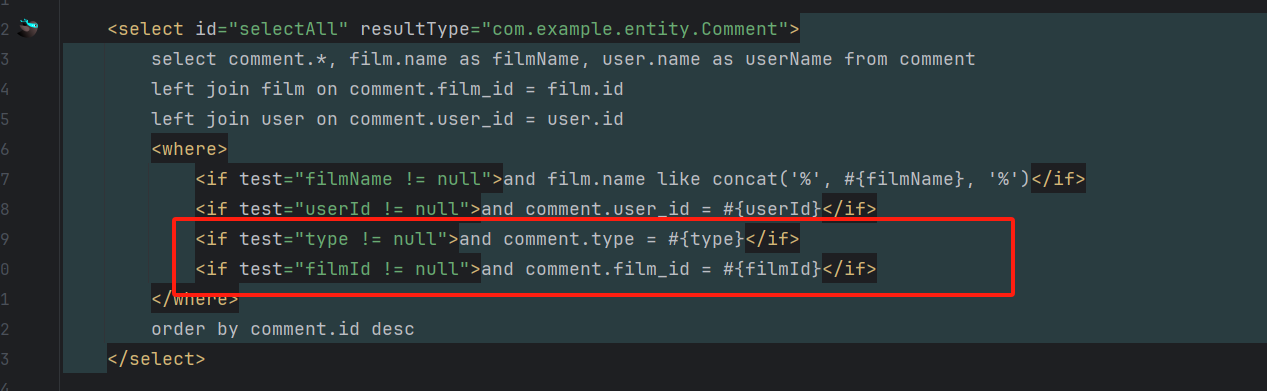
在 sql 这里加一个 type 的条件和 filmId 条件
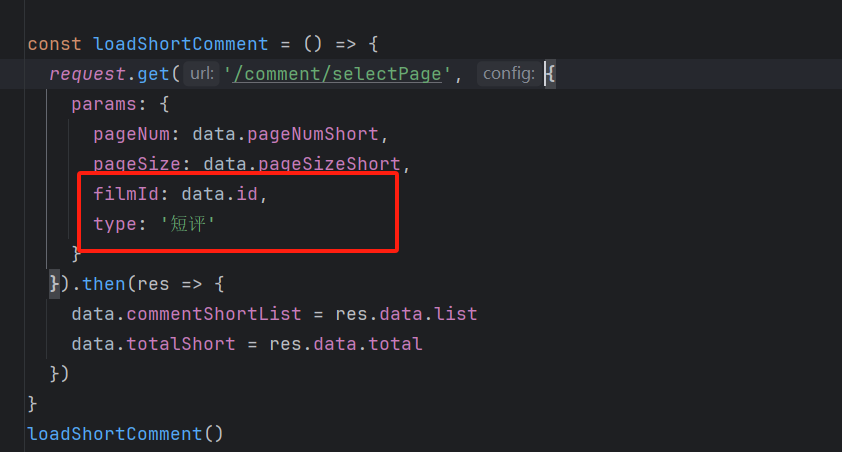
在前端页面这里加一个 type 的参数和filmId 参数
富文本
官网
安装
npm install @wangeditor/editor --save
npm install @wangeditor/editor-for-vue@next --save
引入
import '@wangeditor/editor/dist/css/style.css' // 引入 css
import {onBeforeUnmount, ref, shallowRef} from "vue";
import { Editor, Toolbar } from '@wangeditor/editor-for-vue'
初始化(表单中)
wangEditor 5 富文本字段可以直接和form中的字段使用v-model进行绑定
<el-form-item label="项目介绍" prop="content">
  <div style="border: 1px solid #ccc; width: 100%">
    <Toolbar
        style="border-bottom: 1px solid #ccc"
        :editor="editorRef"
        :mode="mode"
    />
    <Editor
        style="height: 500px; overflow-y: hidden;"
        v-model="data.form.comment"
        :mode="mode"
      	:defaultConfig="editorConfig"
        @onCreated="handleCreated"
    />
  </div>
</el-form-item>
/* wangEditor5 初始化开始 */
const baseUrl = import.meta.env.VITE_BASE_URL
const editorRef = shallowRef()  // 编辑器实例,必须用 shallowRef
const mode = 'default'
const editorConfig = { MENU_CONF: {} }
// 图片上传配置
editorConfig.MENU_CONF['uploadImage'] = {
  server: baseUrl + '/files/wang/upload',  // 服务端图片上传接口
  fieldName: 'file'  // 服务端图片上传接口参数
}
// 组件销毁时,也及时销毁编辑器,否则可能会造成内存泄漏
onBeforeUnmount(() => {
  const editor = editorRef.value
  if (editor == null) return
  editor.destroy()
})
// 记录 editor 实例,重要!
const handleCreated = (editor) => {
  editorRef.value = editor
}
/* wangEditor5 初始化结束 */
从外面引入的图片无法显示怎么办?
在 index.html 里面加一个标签即可
<meta name="referrer" content="never">
本节课源码
<template>
  <div>
    <div style="display: flex; align-items: flex-start; grid-gap: 10px">
      <div style="flex: 1; width: 0">
        <div class="card" style="padding: 20px; margin-bottom: 10px">
          <div style="display: flex; align-items: center;">
            <div style="font-weight: bold; font-size: 18px; flex: 1">{{ data.film.name }}</div>
            <div>
              <el-button type="primary" plain @click="addComment('短评')">写短评</el-button>
              <el-button type="success" plain @click="addComment('长评')">写长评</el-button>
            </div>
          </div>
          <div style="margin-bottom: 20px">
            <el-rate v-model="data.film.score" disabled allow-half show-score></el-rate>
          </div>

          <div style="display: flex; grid-gap: 20px; margin-bottom: 20px">
            <img :src="data.film.cover" alt="" style="width: 200px; height: 270px; border-radius: 5px">
            <div style="flex: 1; color: #666">
              <div style="margin-bottom: 10px"><strong>导演:</strong>{{ data.film.director }}</div>
              <div style="margin-bottom: 10px"><strong>主演:</strong>{{ data.film.actors }}</div>
              <div style="margin-bottom: 10px"><strong>类型:</strong>{{ data.film.categoryName }}</div>
              <div style="margin-bottom: 10px"><strong>制片国家/地区:</strong>{{ data.film.country }}</div>
              <div style="margin-bottom: 10px"><strong>语言:</strong>{{ data.film.language }}</div>
              <div style="margin-bottom: 10px"><strong>上映日期:</strong>{{ data.film.date }}</div>
              <div style="margin-bottom: 10px"><strong>片长:</strong>{{ data.film.duration }}</div>
              <div style="margin-bottom: 10px"><strong>IMDb:</strong>{{ data.film.imdb }}</div>
            </div>
          </div>

          <div style="font-size: 20px; color: #1967e3; margin-bottom: 10px">{{ data.film.name }} 的剧情简介</div>
          <div style="color: #666; line-height: 24px; text-align: justify">{{ data.film.descr }}</div>
        </div>

        <div class="card" style="padding: 20px; margin-bottom: 10px">
          <div style="font-size: 20px; color: #239113; margin-bottom: 10px">{{ data.film.name }} 的短评 <span style="font-size: 14px; color: #333">...(全部{{ data.totalShort }}条)</span></div>
          <div style="border-bottom: 1px solid #eee; padding: 20px 0" v-for="item in data.commentShortList" :key="item.id">
            <div style="display: flex; align-items: center; margin-bottom: 5px">
              <span>{{ item.userName }}</span>
              <el-rate style="margin: 0 10px" v-model="item.score" disabled allow-half></el-rate>
              <span style="color: #666">{{ item.time }}</span>
            </div>
            <div style="line-height: 24px; color:  #666;">{{ item.comment }}</div>
          </div>
          <el-pagination layout="total, prev, pager, next" v-model:current-page="data.pageNumShort" v-model:page-size="data.pageSizeShort"
                         :total="data.totalShort" @current-change="loadShortComment" />
        </div>

        <div class="card" style="padding: 20px">
          <div style="font-size: 20px; color: orange; margin-bottom: 10px">{{ data.film.name }} 的长评 <span style="font-size: 14px; color: #333">...(全部{{ data.totalLong }}条)</span></div>
          <div style="border-bottom: 1px solid #eee; padding: 20px 0" v-for="item in data.commentLongList" :key="item.id">
            <div style="display: flex; align-items: center; margin-bottom: 5px">
              <span>{{ item.userName }}</span>
              <el-rate style="margin: 0 10px" v-model="item.score" disabled allow-half></el-rate>
              <span style="color: #666">{{ item.time }}</span>
            </div>
            <div style="line-height: 24px; color:  #666; margin-bottom: 5px" class="line3" v-html="item.comment"></div>
            <div><span style="color: #1967e3; cursor: pointer" @click="viewLongComment(item.comment)">查看更多...</span></div>
          </div>
          <el-pagination layout="total, prev, pager, next" v-model:current-page="data.pageNumLong" v-model:page-size="data.pageSizeLong"
                         :total="data.totalLong" @current-change="loadLongComment" />
        </div>
      </div>

      <div style="width: 300px; padding: 20px" class="card">
        <div style="font-size: 20px; margin-bottom: 20px">推荐电影</div>
        <div style="margin-bottom: 20px; cursor: pointer" v-for="item in data.recommendList" :key="item.id" @click="goDetail(item.id)">
          <img :src="item.cover" alt="" style="width: 100%; margin-bottom: 5px">
          <div style="font-size: 18px">{{ item.name }}</div>
          <div>
            <el-rate v-model="item.score" disabled allow-half show-score></el-rate>
          </div>
        </div>
      </div>
    </div>

    <el-dialog v-model="data.formVisible" title="评论信息" width="50%">
      <el-form :model="data.form" label-width="80px" style="padding-right: 20px">
        <el-form-item label="打分">
          <el-rate v-model="data.form.score" allow-half show-score></el-rate>
        </el-form-item>
        <el-form-item label="内容" v-if="data.form.type === '短评'">
          <el-input :rows="5" type="textarea" v-model="data.form.comment" autocomplete="off" placeholder="请输入内容" />
        </el-form-item>
        <el-form-item label="内容" prop="comment" v-if="data.form.type === '长评'">
          <div style="border: 1px solid #ccc; width: 100%">
            <Toolbar
                style="border-bottom: 1px solid #ccc"
                :editor="editorRef"
                :mode="mode"
            />
            <Editor
                style="height: 500px; overflow-y: hidden;"
                v-model="data.form.comment"
                :mode="mode"
                :defaultConfig="editorConfig"
                @onCreated="handleCreated"
            />
          </div>
        </el-form-item>
      </el-form>
      <template #footer>
        <div class="dialog-footer">
          <el-button @click="data.formVisible = false">取 消</el-button>
          <el-button type="primary" @click="save">保 存</el-button>
        </div>
      </template>
    </el-dialog>

    <el-dialog v-model="data.formVisibleView" title="长评" width="50%">
      <div style="line-height: 24px">
        <div class="longComment" v-html="data.comment"></div>
      </div>
      <template #footer>
        <div class="dialog-footer">
          <el-button @click="data.formVisibleView = false">关闭</el-button>
        </div>
      </template>
    </el-dialog>


  </div>
</template>

<script setup>
import { reactive } from "vue";
import router from "@/router";
import request from "@/utils/request";
import {ElMessage} from "element-plus";
import '@wangeditor/editor/dist/css/style.css' // 引入 css
import {onBeforeUnmount, ref, shallowRef} from "vue";
import { Editor, Toolbar } from '@wangeditor/editor-for-vue'

const data = reactive({
  id: router.currentRoute.value.query.id,
  film: {},
  recommendList: [],
  formVisible: false,
  form: {},
  pageNumShort: 1,
  pageSizeShort: 3,
  totalShort: 0,
  commentShortList: [],
  user: JSON.parse(localStorage.getItem('system-user') || '{}'),
  pageNumLong: 1,
  pageSizeLong: 3,
  totalLong: 0,
  commentLongList: [],
  formVisibleView: false,
  comment: null
})

/* wangEditor5 初始化开始 */
const baseUrl = import.meta.env.VITE_BASE_URL
const editorRef = shallowRef()  // 编辑器实例,必须用 shallowRef
const mode = 'default'
const editorConfig = { MENU_CONF: {} }
// 图片上传配置
editorConfig.MENU_CONF['uploadImage'] = {
  server: baseUrl + '/files/wang/upload',  // 服务端图片上传接口
  fieldName: 'file'  // 服务端图片上传接口参数
}
// 组件销毁时,也及时销毁编辑器,否则可能会造成内存泄漏
onBeforeUnmount(() => {
  const editor = editorRef.value
  if (editor == null) return
  editor.destroy()
})
// 记录 editor 实例,重要!
const handleCreated = (editor) => {
  editorRef.value = editor
}
/* wangEditor5 初始化结束 */

const viewLongComment = (comment) => {
  data.comment = comment
  data.formVisibleView = true
}

const addComment = (type) => {
  data.form = { type: type }
  data.formVisible = true
}

// 新增评论的方法
const save = () => {
  data.form.filmId = data.id
  data.form.userId = data.user.id
  request.post('/comment/add', data.form).then(res => {
    if (res.code === '200') {
      data.formVisible = false
      ElMessage.success('评论成功')
      loadShortComment()
      loadLongComment()
    } else {
      ElMessage.success(res.msg)
    }
  })
}

const loadShortComment = () => {
  request.get('/comment/selectPage', {
    params: {
      pageNum: data.pageNumShort,
      pageSize: data.pageSizeShort,
      filmId: data.id,
      type: '短评'
    }
  }).then(res => {
    data.commentShortList = res.data.list
    data.totalShort = res.data.total
  })
}
loadShortComment()

const loadLongComment = () => {
  request.get('/comment/selectPage', {
    params: {
      pageNum: data.pageNumShort,
      pageSize: data.pageSizeShort,
      filmId: data.id,
      type: '长评'
    }
  }).then(res => {
    data.commentLongList = res.data.list
    data.totalLong = res.data.total
  })
}
loadLongComment()

request.get('/film/selectById/' + data.id).then(res => {
  data.film = res.data
})

request.get('/film/selectRecommend/' + data.id).then(res => {
  data.recommendList = res.data
})

const goDetail = (id) => {
  location.href = '/filmDetail?id=' + id
}
</script>

<style>
.longComment img {
  width: 100% !important;
}
</style>