03. 使用代码生成器自动生成后端代码
在 Plugin 里面安装 EasyCode 插件
模板代码
Entity.java.vm
## 1. 定义包路径和文件名
$!{callback.setFileName($tool.append($tableInfo.name, ".java"))}
$!{callback.setSavePath($tool.append($tableInfo.savePath, "/entity"))}

## 2. 动态获取包名
package $!{tableInfo.savePackageName}.entity;

import jakarta.persistence.*;
import lombok.Data;

## 预处理:判断是否需要导入特定的包
#set($hasBigDecimal = false)
#set($hasDate = false)
#foreach($column in $tableInfo.fullColumn)
    ## 增加对 Java 类型的判断,防止 sqlType 抓取不到的情况
    #if($column.sqlType.toLowerCase().contains("decimal") || $column.type.equals("java.math.BigDecimal"))
        #set($hasBigDecimal = true)
    #end
    #if($column.type.equals("java.util.Date"))
        #set($hasDate = true)
    #end
#end

#if($hasBigDecimal)
import java.math.BigDecimal;
#end
#if($hasDate)
import java.util.Date;
#end

/**
 * $!{tableInfo.comment}($!{tableInfo.name}) 实体类
 */
@Data
@Entity
@Table(name = "$!{tableInfo.obj.name}")
public class $!{tableInfo.name} {

#foreach($column in $tableInfo.fullColumn)
    /**
     * $!{column.comment}
     */
#if(${column.obj.name} == ${tableInfo.pkColumn[0].obj.name})
    @Id
    @GeneratedValue(strategy = GenerationType.IDENTITY)
#else
    ## 建议加上 @Column 注解,映射数据库字段名,防止驼峰命名不匹配
    @Column(name = "$!{column.obj.name}")
#end
    private $!{tool.getClsNameByFullName($column.type)} $!{column.name};

#end
}
Repository.java,vm
## 1. 自动计算保存路径并设置文件名
$!{callback.setSavePath($tool.append($tableInfo.savePath, "/repository"))}
$!{callback.setFileName($tool.append($tableInfo.name, "Repository.java"))}

## 2. 获取基础包名
package $!{tableInfo.savePackageName}.repository;

import $!{tableInfo.savePackageName}.entity.$!{tableInfo.name};
import org.springframework.data.jpa.repository.JpaRepository;
import org.springframework.stereotype.Repository;

/**
 * $!{tableInfo.comment} 数据库操作层
 * 由 EasyCode 自动生成
 */
@Repository
public interface $!{tableInfo.name}Repository extends JpaRepository<$!{tableInfo.name}, Integer> {

}
Service.java.vm
## 1. 自动计算保存路径并设置文件名
$!{callback.setSavePath($tool.append($tableInfo.savePath, "/service"))}
$!{callback.setFileName($tool.append($tableInfo.name, "Service.java"))}

## 2. 获取基础包名
package $!{tableInfo.savePackageName}.service;

import $!{tableInfo.savePackageName}.common.PageInfo;
import $!{tableInfo.savePackageName}.entity.$!{tableInfo.name};
import $!{tableInfo.savePackageName}.exception.CustomException;
import $!{tableInfo.savePackageName}.repository.$!{tableInfo.name}Repository;
import jakarta.annotation.Resource;
import org.springframework.data.domain.*;
import org.springframework.stereotype.Service;

import java.util.ArrayList;
import java.util.List;

/**
 * $!{tableInfo.comment} 业务逻辑层
 */
@Service
public class $!{tableInfo.name}Service {

    @Resource
    private $!{tableInfo.name}Repository $!tool.firstLowerCase($tableInfo.name)Repository;

    /**
     * 新增或者更新
     */
    public void save($!{tableInfo.name} $!tool.firstLowerCase($tableInfo.name)) {
        $!{tool.firstLowerCase($tableInfo.name)}Repository.save($!tool.firstLowerCase($tableInfo.name));
    }

    /**
     * 删除
     */
    public void deleteById(Integer id) {
        $!{tool.firstLowerCase($tableInfo.name)}Repository.deleteById(id);
    }

    /**
     * 批量删除
     */
    public void deleteBatch(List<Integer> ids) {
        $!{tool.firstLowerCase($tableInfo.name)}Repository.deleteAllByIdInBatch(ids);
    }

    /**
     * 单个查询
     */
    public $!{tableInfo.name} findById(Integer id) {
        return $!{tool.firstLowerCase($tableInfo.name)}Repository.findById(id).orElse(null);
    }

    /**
     * 查询所有数据
     */
    public List<$!{tableInfo.name}> findAll($!{tableInfo.name} $!tool.firstLowerCase($tableInfo.name)) {
        ExampleMatcher matcher = ExampleMatcher.matching()
                .withStringMatcher(ExampleMatcher.StringMatcher.CONTAINING)
                .withIgnoreCase();
        Example<$!{tableInfo.name}> example = Example.of($!tool.firstLowerCase($tableInfo.name), matcher);
        return $!{tool.firstLowerCase($tableInfo.name)}Repository.findAll(example);
    }

    /**
     * 分页模糊查询所有数据
     */
    public PageInfo<$!{tableInfo.name}> findPage($!{tableInfo.name} $!tool.firstLowerCase($tableInfo.name), Integer pageNum, Integer pageSize) {
        // 定义通用模糊匹配规则
        ExampleMatcher matcher = ExampleMatcher.matching()
                .withStringMatcher(ExampleMatcher.StringMatcher.CONTAINING)
                .withIgnoreCase();
        Example<$!{tableInfo.name}> example = Example.of($!tool.firstLowerCase($tableInfo.name), matcher);
        PageRequest pageRequest = PageRequest.of(pageNum - 1, pageSize, Sort.by("id").descending());
        Page<$!{tableInfo.name}> page = $!{tool.firstLowerCase($tableInfo.name)}Repository.findAll(example, pageRequest);
        return PageInfo.of(page);
    }

}
Controller.java.vm
## 1. 自动计算保存路径并设置文件名
$!{callback.setSavePath($tool.append($tableInfo.savePath, "/controller"))}
$!{callback.setFileName($tool.append($tableInfo.name, "Controller.java"))}

## 2. 获取基础包名 (假设你的 package 是 com.example.controller)
package $!{tableInfo.savePackageName}.controller;

import $!{tableInfo.savePackageName}.common.PageInfo;
import $!{tableInfo.savePackageName}.common.Result;
import $!{tableInfo.savePackageName}.entity.$!{tableInfo.name};
import $!{tableInfo.savePackageName}.service.$!{tableInfo.name}Service;
import io.swagger.v3.oas.annotations.Operation;
import io.swagger.v3.oas.annotations.tags.Tag;
import jakarta.annotation.Resource;
import org.springframework.web.bind.annotation.*;

import java.util.List;

/**
 * $!{tableInfo.comment} controller 接口层
 */
@RestController
@RequestMapping("/$!tool.firstLowerCase($tableInfo.name)")
@Tag(name = "$!{tableInfo.comment}模块")
public class $!{tableInfo.name}Controller {

    @Resource
    private $!{tableInfo.name}Service $!tool.firstLowerCase($tableInfo.name)Service;

    /**
     * 新增或更新
     */
    @Operation(summary = "新增或更新$!{tableInfo.comment}")
    @PostMapping("/save")
    public Result save(@RequestBody $!{tableInfo.name} $!tool.firstLowerCase($tableInfo.name)) {
        $!tool.firstLowerCase($tableInfo.name)Service.save($!tool.firstLowerCase($tableInfo.name));
        return Result.success();
    }

    /**
     * 根据ID删除
     */
    @Operation(summary = "根据ID删除$!{tableInfo.comment}")
    @DeleteMapping("/deleteById/{id}")
    public Result deleteById(@PathVariable Integer id) {
        $!tool.firstLowerCase($tableInfo.name)Service.deleteById(id);
        return Result.success();
    }

    /**
     * 批量根据ID删除
     */
    @Operation(summary = "批量删除$!{tableInfo.comment}")
    @DeleteMapping("/deleteBatch")
    public Result deleteBatch(@RequestBody List<Integer> ids) {
        $!tool.firstLowerCase($tableInfo.name)Service.deleteBatch(ids);
        return Result.success();
    }

    /**
     * 根据ID查询
     */
    @Operation(summary = "批量ID查询$!{tableInfo.comment}")
    @GetMapping("/findById/{id}")
    public Result findById(@PathVariable Integer id) {
        $!{tableInfo.name} $!tool.firstLowerCase($tableInfo.name) = $!tool.firstLowerCase($tableInfo.name)Service.findById(id);
        return Result.success($!tool.firstLowerCase($tableInfo.name));
    }

    /**
     * 查询所有
     */
    @Operation(summary = "查询所有$!{tableInfo.comment}")
    @GetMapping("/findAll")
    public Result findAll($!{tableInfo.name} $!tool.firstLowerCase($tableInfo.name)) {
        List<$!{tableInfo.name}> all = $!tool.firstLowerCase($tableInfo.name)Service.findAll($!tool.firstLowerCase($tableInfo.name));
        return Result.success(all);
    }

    /**
     * 分页查询
     */
    @Operation(summary = "分页查询$!{tableInfo.comment}")
    @GetMapping("/findPage")
    public Result findPage($!{tableInfo.name} $!tool.firstLowerCase($tableInfo.name),
                           @RequestParam(defaultValue = "1") Integer pageNum,
                           @RequestParam(defaultValue = "10") Integer pageSize) {
        PageInfo<$!{tableInfo.name}> pageInfo = $!tool.firstLowerCase($tableInfo.name)Service.findPage($!tool.firstLowerCase($tableInfo.name), pageNum, pageSize);
        return Result.success(pageInfo);
    }

}
建表规则
- 表必须有 ID 的主键 主键是自增的
- 表必须写注释
- 字段必须写注释
- 字段不能是数据库或者 java 的关键字 class(clazz)
-- auto-generated definition
create table book
(
    id        int auto_increment comment 'ID'
        primary key,
    name      varchar(50)    null comment '名称',
    img       varchar(255)   null comment '封面',
    price     decimal(10, 2) null comment '价格',
    author    varchar(50)    null comment '作者',
    publisher varchar(50)    null comment '出版社',
    date      varchar(50)    null comment '出版日期'
)
    comment '图书信息';
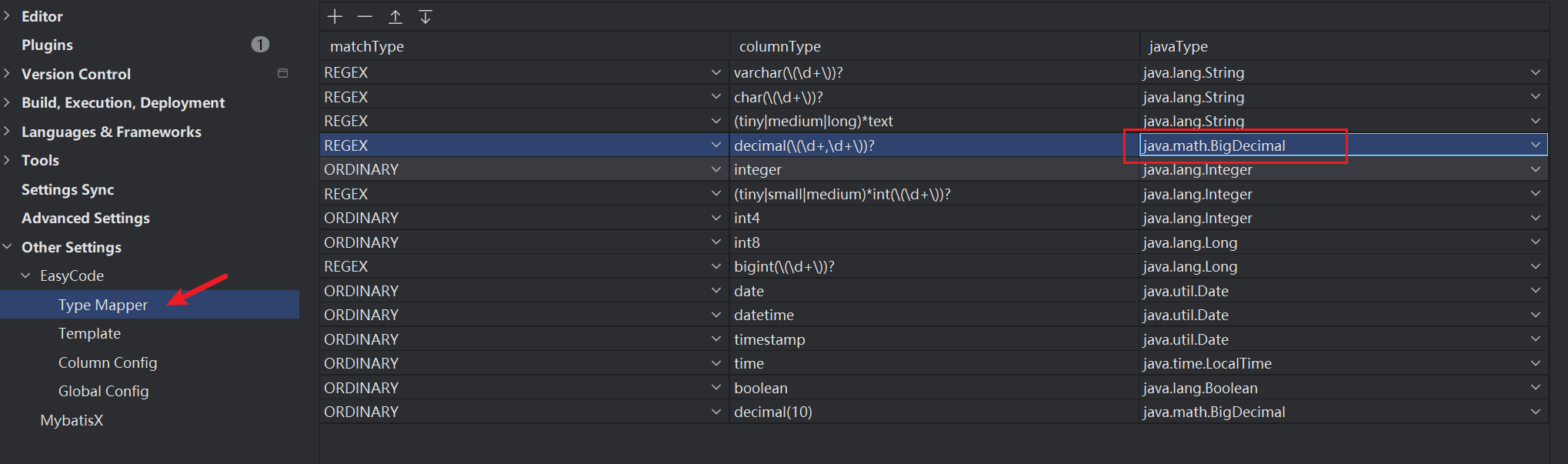
decimal(10,2) -> BigDecimal
配置 EasyCode 的 Type Mapper